
Australia has no single, standalone cookie law. Cookie use is instead governed by the Privacy Act 1988 and the Australian Privacy Principles whenever cookies collect personal information, and the OAIC’s guidance on tracking pixels makes clear that sensitive-data tracking needs express consent. The safest default for most Australian businesses, especially those with international visitors, is to block non-essential cookies until visitors actively agree to them.
TL;DR:
- Australian businesses must ensure cookies that can identify individuals or link to sensitive data comply with the Privacy Act and require express, informed consent.
- The safest default is to block non-essential cookies until visitors actively opt in, especially for marketing and analytics tools that collect personal information.
- Implementing proper prior blocking, a full cookie audit, and matching privacy policies are crucial for legal compliance and accurate tracking.
- Tracking pixels on sensitive pages must be restricted or require explicit consent, as recent OAIC rulings emphasize the collection of sensitive information.
- The recommended approach includes granular consent options, regular testing, and contractual safeguards with vendors to prevent unauthorized data collection.
Table of Contents
- How Australian law treats cookies under the Privacy Act and APPs
- Which cookies need consent: a practical classification
- Consent models and the recommended approach for Australian businesses
- How to implement cookie consent on your Australian website
- Tracking pixels, sensitive information, and recent OAIC determinations
- Cookie consent checklist and the mistakes that trip up Australian sites
- Agency perspective: privacy compliance and conversion aren’t actually opposed
- Get your cookie consent and tracking set up properly
- Where to check the rules yourself
- Sources
- FAQ
How Australian law treats cookies under the Privacy Act and APPs
A cookie only triggers privacy obligations when it collects, or combines with other data to reasonably identify, an individual. That’s the legal test that matters, and it’s narrower than the GDPR’s “any identifier” standard but broader than most site owners assume. A cookie that logs a random session ID means nothing on its own. Link that ID to an email address, a purchase history, or a device fingerprint used for retargeting, and it becomes personal information under the Privacy Act and Australian Privacy Principles.
Once that threshold is crossed, several APPs apply at once: APP 1 (open and transparent management), APP 3 (collection), and APP 6 (use and disclosure). Businesses often assume the small business exemption gets them off the hook, but the exceptions catch more operators than people expect.
The exemption does not apply if your business has a turnover exceeding the small business threshold
- Trades in personal information for a benefit, service, or advantage
- Is a health service provider (this covers most clinics, allied health, and telehealth platforms)
- Is related to a business that isn’t exempt
- Operates as a credit reporting body or handles tax file numbers
That last point about trading personal information is the trap. Any ecommerce store running third-party ad pixels, affiliate tracking, or a data-sharing arrangement with a marketing platform is arguably “disclosing information for a benefit,” which pulls even a sole trader back inside the Privacy Act regardless of turnover.
The OAIC’s pixel guidance adds another layer: prior notice matters. If a tag fires before a visitor has any reasonable chance to know what it does, that’s a compliance gap regardless of what your Privacy Policy says buried in paragraph nine. Recent commentary from Allens on OAIC determinations reinforces that regulators are actively scrutinising how pixels get deployed, not just what policies claim.
There’s also a consumer law angle worth flagging. If your cookie banner or Privacy Policy says “we don’t share data with third parties” while a Meta Pixel or Google Ads tag is quietly firing on page load, that’s a misleading representation under the Australian Consumer Law, separate from any Privacy Act exposure. Two regulators, two ways to get caught out.
Which cookies need consent: a practical classification
Not every cookie carries the same risk, and treating them all the same either over-blocks your analytics or under-protects your visitors. Four categories cover almost everything you’ll find in a cookie audit.
- Strictly necessary cookies. These keep a shopping cart working, remember a login session, or maintain load balancing. They’re generally exempt from consent requirements because the site cannot function without them, but “necessary” gets abused constantly. A cookie that remembers a discount code isn’t necessary. A cookie that keeps a checkout session alive is.
- Analytics cookies. Google Analytics, Hotjar, and similar tools sit in a grey zone. Aggregated, anonymised analytics carries lower risk. The moment you combine analytics data with a customer ID, email capture, or cross-device tracking, it becomes personal information and needs the same treatment as marketing cookies.
- Marketing and advertising cookies. Pixels from Meta, TikTok, Pinterest, and Google Ads almost always qualify as personal information collection because they’re built to identify and retarget individuals across sites. These carry the highest compliance risk and the ACCC’s guidance on cookie types is a useful primer on how persistent tracking actually works under the hood.
- Functional and preference cookies. Language settings, currency selection, and layout preferences. Low risk unless tied back to an identifiable profile.
The decision rule is simple: ask whether the cookie’s purpose is to identify a person, whether it could reasonably be combined with other data to do so, and whether a third-party vendor receives that data. Any “yes” moves it into consent-required territory.
Consent models and the recommended approach for Australian businesses
Three consent models show up in practice, and picking the wrong one is where most Australian sites get caught out.
Opt-in with prior blocking stops non-essential cookies from firing until a visitor actively agrees. This is the GDPR-style approach, and it’s increasingly the sensible default even without a strict legal mandate, because it eliminates the “we collected data before consent” problem entirely. Sprintlaw’s guidance recommends this model specifically for businesses with EU or UK customers, where GDPR applies regardless of where the business is based.
Opt-out or continued browsing treats scrolling or clicking anywhere on the page as implied consent. It’s still technically viable for low-risk cookies under Australian law, but it offers no protection at all against sensitive-data pixel claims, and the OAIC has signalled it won’t accept implied consent for anything touching sensitive categories.
Granular preferences let visitors switch categories on and off individually. This is the model most legal commentators now recommend as best practice, provided the “reject” and “manage preferences” options carry the same visual weight as “accept.”
That last point is where a lot of banners fail on pure UX grounds:
- A bright green “Accept All” button next to a grey, barely visible “Reject” link isn’t genuine choice
- Pre-ticked boxes for marketing cookies undermine the whole point of asking
- A banner that reappears every session because the consent cookie itself got blocked defeats its own purpose
Pro Tip: If you sell into the UK or EU, geo-target a stricter, full opt-in experience for those visitors specifically, while running a lighter granular model for your Australian audience. You get the compliance cover where it’s legally mandatory without frustrating local customers with an unnecessarily heavy banner.
For most Australian ecommerce and service businesses, the safest default is: non-essential cookies off until consent, marketing and analytics grouped as separate toggles, and prior blocking enforced at the tag-manager level rather than trusted to the vendor’s own script.
How to implement cookie consent on your Australian website
Getting from “we know we need this” to “it’s actually working correctly” takes more than pasting in a banner script. Here’s the sequence that holds up under scrutiny.
- Run a full cookie and tag audit. Open your site in an incognito browser and log every cookie, pixel, and third-party script that fires, including ones you didn’t knowingly install (affiliate networks and embedded video players are common surprises). Build a vendor inventory listing each tool’s purpose, data retention period, and whether it processes anything that could be sensitive information. A quarterly refresh is the recommended cadence, or immediately after adding any new marketing tool.
- Select a consent management platform or built-in tool. Shopify, WordPress, and most modern platforms support a CMP plugin or native cookie consent module. Choose one that supports genuine prior blocking, not just a cosmetic banner that displays while scripts fire underneath it anyway.
- Configure prior-blocking rules by category. Set the CMP to physically prevent marketing and non-essential analytics scripts from loading until the relevant consent category is switched on. This is the step most implementations get wrong: the banner looks compliant, but the Google Ads tag already fired on page load regardless.
- Wire consent signals into your tag manager. In Google Tag Manager, set up consent state variables and trigger conditions so tags only fire once the CMP passes a “granted” signal for that category. For advertising tags specifically, consider server-side tagging to preserve measurement accuracy while still respecting the visitor’s consent choice.
- Update your Privacy Policy and Cookie Policy to match reality. List every category of cookie actually in use, name the vendors, and state retention periods honestly. A policy that describes cookies you removed two years ago is a liability, not a formality.
- Put data processing agreements in place with vendors. Any third party receiving personal information, ad platforms, analytics tools, email providers, needs a documented agreement covering how that data gets used and stored.
- Log consent and set a re-consent cadence. Store timestamped records of what each visitor consented to and when, and rerun consent prompts after a reasonable period (12 months is a common benchmark) or whenever your cookie categories change materially.
- Test on mobile and desktop separately. Open dev tools, check the network tab, and confirm zero marketing or analytics requests fire before you click “accept.” Test the reject path too. Plenty of banners work perfectly for acceptance and silently ignore rejection.
Pro Tip: Screen record your own consent flow on a phone once a quarter. It’s the fastest way to catch a plugin update that quietly re-enabled a tag before consent, something that happens more often than most site owners realise.
Tracking pixels, sensitive information, and recent OAIC determinations
Tracking pixels get treated as background plumbing by most marketing teams, but the OAIC doesn’t see them that way. Guidance on pixels explicitly states that when a pixel collects or infers sensitive information, health conditions, sexual orientation, religious belief, or similar categories, implied consent through a passive banner isn’t good enough. APP 3.3 requires express, informed, and specific consent for that data.
A Meta Pixel on a health clinic’s booking page that fires before consent can transmit page URLs revealing a visit to a fertility service or mental health provider. That URL alone can constitute sensitive information under the Privacy Act, even without a name attached, once it’s combined with an identifier the pixel also sends.
This is precisely the scenario Allens’ analysis of recent OAIC determinations highlights: organisations treating pixel deployment as a “set and forget” marketing task, unaware the pixel was quietly transmitting sensitive inferences to a third-party ad platform.
Practical mitigation isn’t complicated, but it takes deliberate configuration rather than default settings:
- Disable or heavily restrict pixels on any page dealing with health, finance, legal, or similarly sensitive content
- Apply prior blocking so pixels on those pages never fire without explicit, specific consent, separate from general cookie acceptance
- Put contractual controls in vendor agreements limiting what categories of data a pixel is permitted to capture
Health services, legal practices, and financial advisers carry the highest exposure here, precisely the sectors least likely to have the small business exemption available to them in the first place.
Cookie consent checklist and the mistakes that trip up Australian sites
Run through this before calling your implementation done:
- Cookie and tag inventory completed and dated
- CMP installed with genuine prior blocking, not cosmetic banners
- Categories mapped to actual site behaviour (no phantom “we don’t use marketing cookies” claims)
- Privacy Policy and Cookie Policy updated to match the current tag list
- Data processing agreements signed with every vendor handling personal information
- Consent log capturing timestamp and category choices per visitor
- Test plan run on both mobile and desktop, checking accept and reject paths
- Review cadence set, quarterly audit at minimum, or after any new vendor goes live
The mistakes that show up repeatedly follow a pattern. Scripts firing before the visitor has made a choice is the single most common failure, usually because a plugin update reset the blocking rules. Vague, hedge-everything banner language (“we may use cookies to enhance your experience”) satisfies nobody, not the regulator and not the visitor trying to make an informed choice. Burying the reject option behind two extra clicks while “Accept All” sits front and centre undermines the entire consent model. And running an inconsistent story, marketing cookies “off” in the banner text while still active in the Privacy Policy’s fine print, is exactly the kind of gap that turns a privacy issue into an Australian Consumer Law issue too.
Agency perspective: privacy compliance and conversion aren’t actually opposed
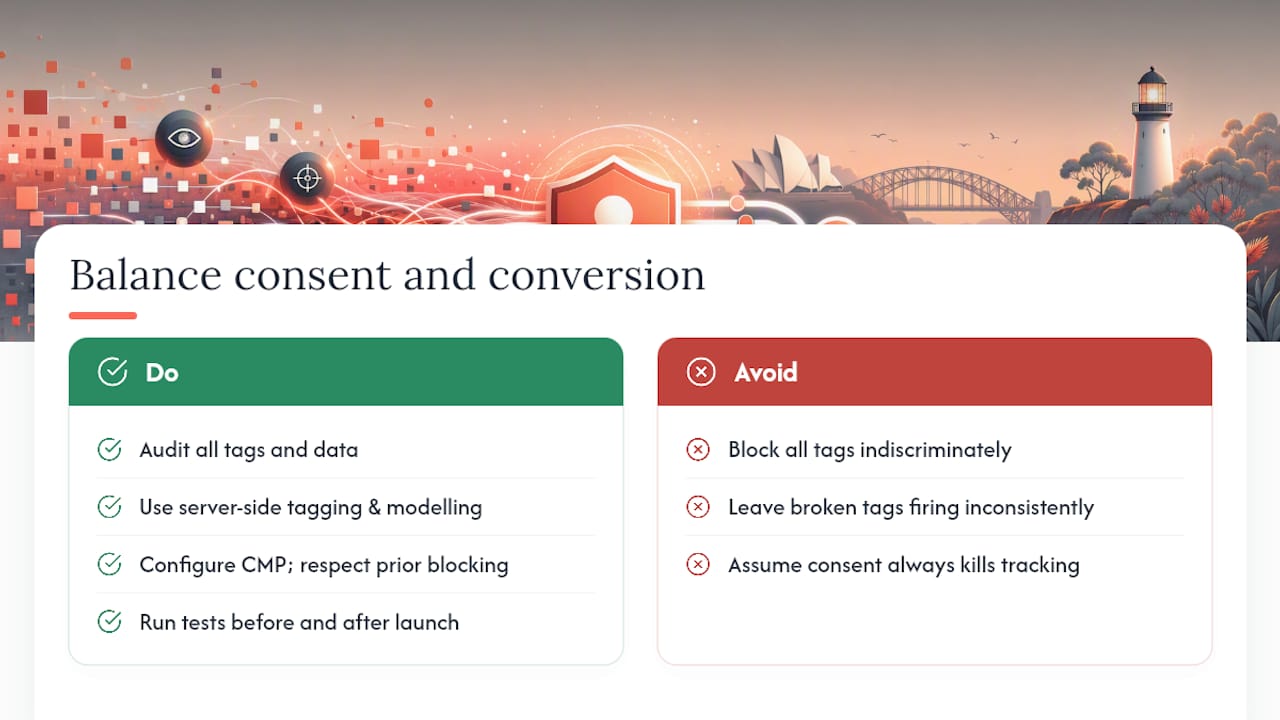
Most site owners assume tightening cookie consent automatically tanks conversion tracking and retargeting performance. That’s the wrong frame. The real cost comes from doing it badly, blocking everything indiscriminately, or leaving broken tags that fire inconsistently, not from doing it properly.
A better approach starts with the audit most businesses skip: knowing exactly which tags exist, what they capture, and which ones actually earn their keep. Server-side tagging and aggregated modelling can preserve most of your measurement signal even with stricter consent gates in place, which matters more than people expect once a meaningful share of visitors start rejecting marketing cookies.
Where should the line sit stricter? Health, legal, and financial services, and any site drawing meaningful EU or UK traffic, don’t have room to experiment with implied consent. Everyone else has more flexibility than they assume, provided the banner is honest and the toggles actually do what they claim.
For a small team without in-house development resources, the realistic path is a focused audit, a properly configured CMP that respects prior blocking, and a test plan run before and after launch. Getting conversion optimisation right alongside consent design, rather than treating them as competing priorities, is where most of the missed value sits.
— Liza
Get your cookie consent and tracking set up properly
Some agencies run cookie and tag audits as part of website design and CRO work, providing hands-on reviews to catch pixels firing before consent or analytics tags duplicating data across platforms. Unlike a generic compliance checklist, this comes from a team that also has to make your marketing measurement work afterwards, so the fix isn’t “turn everything off.”

A typical engagement covers a full vendor inventory, tag manager reconfiguration so consent signals actually control what fires, updated policy language that matches real behaviour, and a documented test plan for mobile and desktop. That’s the difference between a banner that looks compliant and one that holds up if the OAIC ever asks. If your site runs Meta, Google, or TikTok pixels and you’ve never actually verified what fires before a visitor clicks anything, that’s the first thing worth fixing. Start with a website design and CRO assessment to get your consent setup and your conversion tracking working together instead of against each other.
Where to check the rules yourself
- OAIC guidance on tracking pixels and privacy obligations, the primary regulator source on when pixels trigger consent requirements
- NSW Design System cookie consent component, a working government example of banner design and preference dialogs
- Sprintlaw’s cookie consent guidance and its cookie banner compliance checklist
- Allens’ commentary on recent OAIC determinations covering tracking pixels and targeted advertising
- ACCC guidance on cookies and website analytics, a plain-language primer on cookie types and browser controls
- 121 Group’s marketing vendor due-diligence guidance, useful when building your vendor inventory
Sources
- Tracking pixels and privacy obligations — OAIC
- Cookie consent in Australia — Sprintlaw
- Cookie consent — NSW Design System
- Cookies and website analytics — ACCC
FAQ
Does Australia have a standalone cookie law?
No. Cookies fall under the Privacy Act 1988 and the Australian Privacy Principles whenever they collect or combine with other data to identify a person. There’s no separate cookie-specific statute the way some other countries have.
How does cookie consent actually work?
A cookie consent banner or CMP intercepts non-essential scripts before they load, then only releases them once a visitor selects a category, marketing, analytics, or functional, they agree to. Done properly, that consent choice gets logged with a timestamp and feeds directly into the tag manager so scripts stay blocked until the signal changes.
Why do I have to consent to cookies on Australian websites?
Because many cookies, especially advertising pixels, count as collecting personal information under the APPs, and the OAIC requires clear notice or express consent before that collection happens legally. Sites without EU or UK visitors have more flexibility, but sensitive-data tracking always needs express consent regardless of audience.
What are the regulations around cookie consent for small businesses?
The small business exemption (under $3 million turnover) doesn’t apply if a business trades personal information for a benefit, which catches most stores running third-party ad pixels or affiliate tracking. Health service providers and businesses linked to a non-exempt entity are excluded from the exemption entirely.
Can Moormarketing help set up cookie consent for my store?
Yes, cookie and tag audits, consent management platform configuration, and tag manager wiring are part of Moormarketing’s website design and CRO work. Current pricing for these engagements is available directly on the site rather than published as a flat rate.