
Most eCommerce brands should start Facebook Conversions API setup with a partner integration (Shopify’s native channel or an equivalent plugin) and only move to a direct API or server-side Gateway build when custom event tracking demands it. The Pixel stays installed either way; CAPI supplements it, and event deduplication is what stops double-counted conversions. Your first move: confirm you have Business Manager admin access, then copy your Pixel ID from Events Manager.
TL;DR:
- Most brands should start with partner integrations like Shopify or WooCommerce before moving to direct API or server-side solutions, depending on customization needs.
- Proper permission setup, especially admin rights in Business Manager and correct Pixel ID, is crucial to avoid stalled or failed CAPI implementations.
- Deduplication relies on matching exact event_id values between Pixel and server events, with unique identifiers like order IDs being essential for accuracy.
- Security practices demand storing access tokens in environment variables and never exposing them in client-side code or public repositories.
- Achieving a “Good” Event Match Quality score and consistent revenue data are key indicators that a CAPI setup improves ad performance and data reliability.
Table of Contents
- What do you need before starting Facebook Conversions API setup?
- Which integration method should you choose?
- How do you create and protect the CAPI access token?
- What should a Facebook CAPI event payload contain?
- How do you deduplicate Pixel and server-side events?
- How do you test Facebook CAPI events before going live?
- What are the most common CAPI setup mistakes?
- What results come from a correctly wired CAPI setup?
- How does Facebook CAPI handle privacy compliance and consent?
- Why do Pixel and CAPI numbers not match?
- How does CAPI change ad performance measurement?
- Should you automate event tracking or build custom events?
- What the conventional CAPI advice gets wrong
- Get your Facebook CAPI setup done right the first time
- Where to go for official CAPI documentation
- Sources
What do you need before starting Facebook Conversions API setup?
Before you touch a line of code or click “connect” on a partner app, get the access sorted. Half the CAPI setups that stall in week one fail because someone doesn’t have the right permission level in Meta Business Manager, not because the integration itself is hard.
Meta’s own get-started guide lays out the sequence: pick an integration method, prepare your Business Manager and Pixel assets, then generate the access credentials. Here’s what that actually looks like on the ground:
- Business Manager access: You (or whoever runs the ad account) needs admin rights on the Business Manager that owns the Pixel. Partner or agency roles often can’t create system users, so check this first.
- Pixel ID: Open Events Manager, select your Pixel from the data sources list, and copy the numeric ID from the settings tab. You’ll need it for every integration method.
- Platform check: Shopify and BigCommerce both have native Meta channel integrations that handle CAPI with minimal setup. WooCommerce relies on the official Facebook for WooCommerce plugin. Headless or custom stacks (Next.js storefronts, bespoke checkout flows) need a direct API or Gateway build because there’s no platform to plug into.
- Permission model: Admins can do everything, including generating tokens. System users are dedicated non-human accounts built for API access. Developer roles can build and test but may not have asset-level permissions until an admin grants them.
If you’re running a headless storefront or anything outside the mainstream platforms, budget extra time here. Everyone else can usually clear this checklist in under half an hour.
Which integration method should you choose?
The choice comes down to three questions: how much custom event tracking do you need, how much developer time do you have, and how much long-term maintenance are you willing to own?
Partner integrations (the Shopify Meta channel, the Facebook for WooCommerce plugin) are the fastest route. Meta and platform vendors maintain the connection, handle most of the field mapping, and push standard events like Purchase and AddToCart automatically. The trade-off is granularity: custom events, non-standard data fields, and fine-grained hashing control are harder to reach, and you’re dependent on the plugin vendor’s release schedule for bug fixes.
Direct API integration means your developers build and send the HTTP requests to Meta’s Graph API themselves, typically using an official SDK for PHP, Node, or Python. You get full control over every field, every hash, every custom event, but you own the maintenance, including keeping pace with Meta’s API version changes.
Gateway or server-side Google Tag Manager sits in between. A server-side GTM container gives you a managed environment to receive client events and forward them to Meta (and other ad platforms) without hand-rolling the whole pipeline. It’s more flexible than a plugin but still saves you from writing raw API calls, at the cost of hosting a server container yourself or paying for a managed one.
A rough decision checklist:
- Standard eCommerce, limited dev resources → partner integration
- Custom events, in-house developers, long-term control → direct API
- Multiple downstream destinations (ads, analytics), moderate technical skill → server-side GTM
- Tight timeline, willing to pay for speed → automated/managed tools that stitch identifiers and map events faster than a manual build
Plenty of brands run partner integration first, then migrate to direct API or GTM once they hit its ceiling. That’s a reasonable sequence, not a sign the first choice was wrong.
How do you create and protect the CAPI access token?
The access token is the single most sensitive credential in this entire setup. Treat it like a database password, not an API key you paste into a frontend script.
Generate it through a system user, not a personal admin account:
- In Business Manager, go to Business Settings > Users > System Users and create a new system user.
- Assign it the Pixel you copied earlier, with advertise permission (not admin, unless you have a specific reason).
- Generate the access token from that system user’s asset settings, scoped to the Conversions API.
- Store the token in a secure environment variable (
.envfile kept out of version control, or your platform’s secrets manager) rather than hardcoding it anywhere.
Never expose the token in client-side JavaScript, in a public GitHub repo, or in a frontend build bundle. Every CAPI call happens server-side by design, so there’s no legitimate reason for the token to ever reach the browser.
Pro Tip: Rotate your system user token every time a developer with access leaves the project, and set a calendar reminder to rotate it annually regardless. Revoking and regenerating takes two minutes; cleaning up after a leaked production token takes a lot longer.
What should a Facebook CAPI event payload contain?
This is where marketers and developers need to speak the same language, because the fields you send directly determine how well Meta can match your server event to a real ad click.
Every event needs three required fields at minimum: event_name (Purchase, AddToCart, Lead, etc.), event_time (a Unix timestamp), and action_source (typically “website” for eCommerce). Miss any of these and Meta rejects the event outright.
The user_data object is where Event Match Quality lives or dies. Send as many of these as you can reliably capture:
- Hashed email and phone number (SHA-256, lowercase, trimmed of whitespace before hashing)
fbpandfbccookie values, read from the browser and forwarded unhashedclient_ip_addressandclient_user_agent, captured from the actual customer request, not your server
For eCommerce specifically, custom_data should carry value and currency for every Purchase event, plus content_ids when you’re running catalogue-based or dynamic ads.
Passing hashed email plus browser identifiers together improves match rates more than either identifier alone. Skipping the browser identifiers to save a field or two is a false economy.
On hashing: SHA-256 every piece of personally identifiable information before it leaves your server.
test@example.combecomes a 64-character hexadecimal string, and Meta only ever sees that hash, never the raw email. Sending unhashed PII isn’t just a policy violation, it’s a straightforward security failure.
A minimal but solid user_data block looks like this in practice:
"user_data": {
  "em": ["973dfe463ec85785f5f95af5ba3906eeb8f42..."],
  "fbp": "fb.1.1706000000000.1234567890",
  "fbc": "fb.1.1706000000000.AbCdEfGh",
  "client_ip_address": "203.0.113.4",
  "client_user_agent": "Mozilla/5.0 ..."
}
Meta’s own SDKs, including the PHP Business SDK, include a Parameter Builder that auto-fills fbp, fbc, and client_user_agent from the incoming request context, which removes a good chunk of the manual wiring for common server frameworks.
How do you deduplicate Pixel and server-side events?
Deduplication is the part of the setup most likely to go wrong quietly. If you skip it, you don’t get an error message, you just get inflated conversion numbers that make every campaign look better than it actually performed.
The mechanism itself is straightforward once you see it laid out:
- When the browser Pixel fires an event, pass an
eventIDin thefbq()call, something unique and reproducible, like the order ID. - When your server sends the matching CAPI event, pass the exact same value as
event_idin the payload. The string must match character for character, including case. - Meta compares
event_idvalues arriving within its deduplication window and keeps one, discarding the duplicate from reporting. - Use something genuinely unique per event: an order ID for purchases, a UUID generated at form submission for leads. Never reuse an ID across multiple distinct events.
The trickier part is preserving fbclid, _fbc, and _fbp from the initial ad click through to the server-side event, especially on multi-page checkout flows or when the click and the conversion happen minutes or days apart. If you can’t read fbclid directly at the point of conversion, store it in a first-party cookie or a hidden checkout field when the visitor lands, then read it back server-side when the order completes.
client_ip_address and client_user_agent should reflect the actual customer’s browser and connection wherever possible, not your server’s own IP or a generic user agent string. Sending your server’s IP address instead of the customer’s is one of the more common mistakes that quietly tanks match quality.
Pro Tip: Fire the server-side event from a payment webhook (Stripe’s charge.succeeded, Shopify’s orders/paid) rather than the order confirmation page. Confirmation pages fire even when payment later fails or gets refunded; webhooks only fire on confirmed payment.
How do you test Facebook CAPI events before going live?
Events Manager’s Test Events tab is where you confirm the whole pipeline works before it touches real ad spend data. Include a test_event_code parameter in your server requests during this phase; Meta’s Conversions API documentation confirms this lets you validate server events in real time without polluting live reporting.
The practical test sequence:
- Trigger a real flow: a test purchase through checkout, ideally via the actual payment webhook you’ll use in production.
- Watch the Test Events tab for both the browser Pixel event and the server CAPI event arriving with matching
event_idvalues. - Confirm the interface marks one event as deduplicated. Expect a brief window where both appear separately before Meta merges them, which is normal, not a bug.
- Check the Event Match Quality diagnostic score for that event. Meta rates it against a scale from poor to great, and your target should be “Good” or better before you consider the setup production ready.
Test data and live data behave slightly differently: test events show up almost instantly, while live event processing and EMQ scoring can take longer to stabilise once real ad traffic starts flowing. Give it a few days of live volume before you judge the EMQ number too harshly. Moor Marketing’s own Facebook ad testing process follows the same logic: verify in a sandboxed test state before trusting the numbers that feed optimisation decisions.
What are the most common CAPI setup mistakes?
Most CAPI problems trace back to a short list of repeat offenders, and nearly all of them are checkable in five minutes if you know where to look.
- Missing or mismatched
event_id: the single biggest cause of failed deduplication and inflated conversion counts. - Event name mismatches: sending “purchase” from the server when the Pixel fires “Purchase” (capitalisation matters in some implementations, and naming drift between browser and server events breaks matching).
- Server IP instead of client IP: passing your own server’s address as
client_ip_addressinstead of the customer’s, which quietly degrades match quality without throwing an error. - Exposed tokens: committing an access token to a public repository or leaving it in client-side code, which is a security incident, not a bug to fix later.
On the operational side, check your EMQ score weekly rather than once at launch and forget it, and retest after any Meta API version bump or platform update. Rotate system user tokens whenever staff access changes.
Pro Tip: If your in-house team is stretched thin or the stack is more complex than a standard Shopify build, bringing in a specialist for the initial wiring is usually cheaper than the weeks of misattributed ad spend that come from a half-working implementation.
What results come from a correctly wired CAPI setup?
The pattern is consistent across the accounts Moor Marketing has worked on: conversion data gets more reliable, and reliable data changes how confidently you can scale ad spend. One furniture brand case reached $3 million a month in sales once tracking, creative, and media buying were aligned, and a toy retailer hit $2 million in monthly sales conversion using the same foundation of clean event data feeding the optimisation loop. Neither outcome was about the tracking alone, but neither was achievable without it.
A practical checklist to hold your own setup against:
| Check | Target |
|---|---|
| Event Match Quality | “Good” or better in Events Manager |
| Deduplication | One event marked deduplicated per conversion in Test Events |
| Revenue reconciliation | CAPI-reported revenue within a few per cent of actual order revenue |
| Token security | Stored in environment variables, never in client code |
| Review cadence | EMQ and event logs checked weekly |
If your EMQ score is stuck below “Good” after working through the fields above, or your revenue numbers in Ads Manager don’t line up with your order platform, that’s usually the point where a second set of eyes, whether an in-house senior developer or an agency case study worth reviewing for comparison, saves more time than pushing through alone.
How does Facebook CAPI handle privacy compliance and consent?
CAPI doesn’t give you a free pass on privacy law just because the data travels server-to-server instead of through a browser cookie. If anything, it raises the bar, because you’re now processing hashed personal data (email, phone) on your own infrastructure before it reaches Meta.
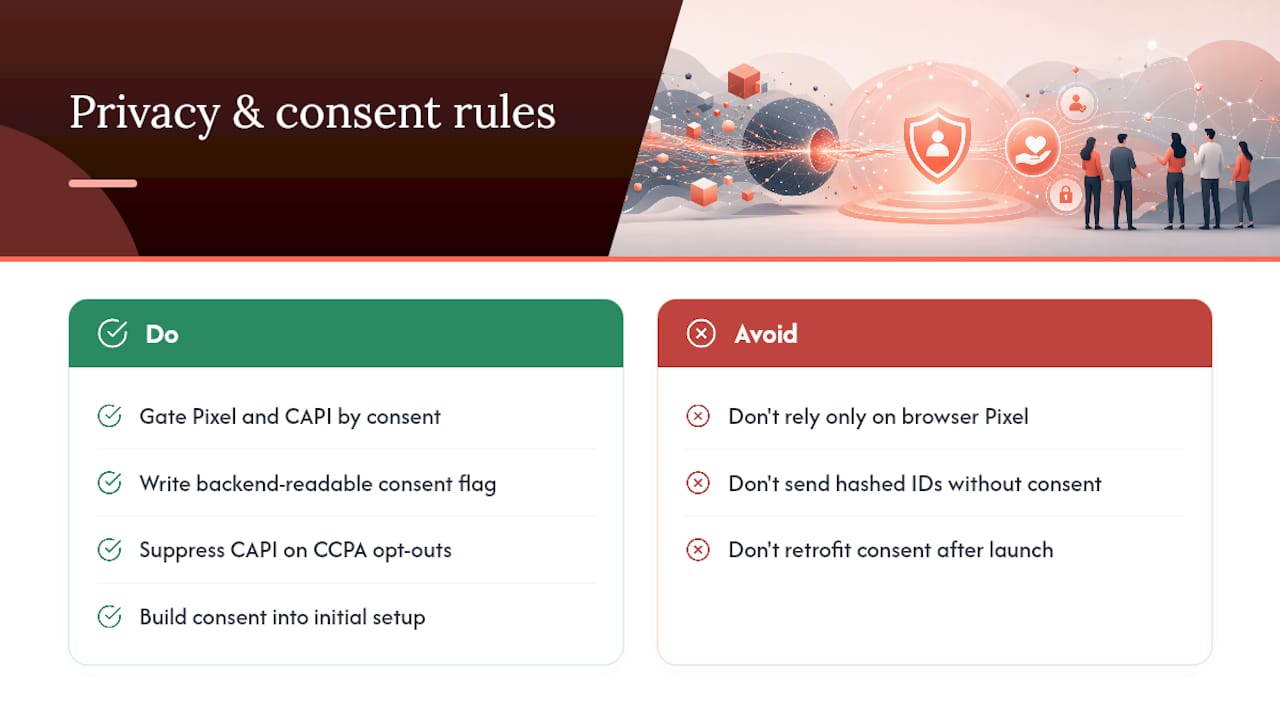
Under GDPR, sending hashed user data to Meta still counts as processing personal data, and you need a lawful basis, typically consent, collected before the Pixel or CAPI event fires. That means your consent management platform needs to gate both the browser Pixel and the server-side event, not just the browser side. A common mistake is blocking the Pixel on a “no consent” cookie banner outcome while the server-side event fires regardless because it’s not tied to the same consent signal.
CCPA and similar US state laws take a different angle, focused on the right to opt out of data “sale” or sharing for advertising purposes. If a visitor opts out, your server-side logic needs to suppress the CAPI call entirely for that session, not just anonymise the payload.
Practically, this means your consent banner tooling needs to write a flag your backend can read, whether that’s a cookie, a session variable, or a value passed through your tag management setup, so the server knows whether it’s allowed to send that event before it tries. Build this into the initial setup rather than retrofitting it once legal flags the gap. It’s considerably harder to bolt consent logic onto an already-live server-side pipeline than to design it in from day one.
Why do Pixel and CAPI numbers not match?
Some discrepancy between Pixel-reported and CAPI-reported conversions is normal and expected. A gap of zero would actually be suspicious, since the two systems capture events through fundamentally different paths.

The Pixel misses events blocked by ad blockers, Safari’s Intelligent Tracking Prevention, or iOS App Tracking Transparency opt-outs. Browser privacy restrictions are the core reason server-side tracking exists in the first place, and that same browser environment is why Pixel-only numbers tend to undercount real conversions.
CAPI, meanwhile, can occasionally overcount if deduplication isn’t wired correctly, or if the server fires events for orders that later get refunded or fail payment (another reason to trigger from a payment-success webhook rather than a confirmation page view).
When you see a persistent gap, work through it in order: check the Test Events tab for deduplication failures first, since a broken event_id match is the most common cause of inflated combined totals. Next, compare your CAPI-reported revenue against your actual order platform revenue for the same date range; a mismatch beyond a few per cent usually points to a payload field issue, often value or currency not being sent correctly. Finally, check whether recent Meta API version updates changed field requirements, since Meta does deprecate and adjust API versions periodically, and an unnoticed version bump can silently break a previously working payload. Set a recurring check, weekly is reasonable, rather than only looking when a client or manager asks why the numbers look odd.
How does CAPI change ad performance measurement?
More complete conversion data doesn’t just make your reporting look tidier. It changes what Meta’s delivery algorithm actually optimises toward, which is where the real performance impact shows up.
Meta’s ad delivery system learns from the conversion signals it receives. When CAPI recovers events the Pixel alone would have missed, especially from users on Safari or iOS who’ve restricted tracking, the algorithm gets a fuller picture of who actually converts. That translates into better audience targeting and, over time, more efficient spend, because the system isn’t optimising against a partial, browser-only dataset.
It also changes attribution windows in practice. Server-side events can be sent with more accurate timestamps and richer identifiers than a browser event firing after a page has already been abandoned or a tab closed mid-checkout, so conversions that would previously have gone unattributed get credited to the correct campaign and ad set.
The EMQ score itself becomes a leading indicator worth watching alongside your usual campaign metrics. A brand that pushes EMQ from “Fair” to “Good” typically sees its reported cost per acquisition tighten, not because the ads improved, but because the system finally has accurate data to judge them by. That’s a meaningful distinction for anyone reviewing campaign performance: a “worse” CPA after a tracking fix can genuinely mean better underlying data rather than worse ads.
Should you automate event tracking or build custom events?
Automated event tracking, whether through a partner plugin’s default event set or a managed tool that maps standard events out of the box, covers the vast majority of eCommerce needs without a single custom field. Purchase, AddToCart, InitiateCheckout, and Lead are standard events Meta already understands, complete with pre-built optimisation models. If your business runs a fairly standard funnel, there’s little upside to reinventing this wiring by hand.
Custom event setup earns its complexity when your business has conversion signals that don’t map to Meta’s standard events: a multi-step onboarding flow, a subscription upgrade, a quote request that isn’t a standard “Lead,” or a marketplace-style transaction with multiple line items needing separate tracking. Building these manually gives you granular control over exactly what data flows where and when, but it also means every future change to your funnel needs a corresponding change to the tracking code.
The sensible recommendation for most eCommerce brands: start with automated standard event tracking through your partner integration, and add custom events only for the specific actions that standard events genuinely can’t capture. Trying to custom-build everything from day one usually means shipping a fragile, over-engineered tracking layer for a business that didn’t need one yet.
What the conventional CAPI advice gets wrong
Most guides treat Facebook Conversions API setup as a purely technical checklist: generate a token, map some fields, done. That framing misses the part that actually determines whether the implementation pays for itself, which is the ongoing discipline of watching Event Match Quality and reconciling revenue numbers after launch.
The developer work and the marketer’s verification work are two halves of one job, not sequential handoffs. A perfectly wired payload with poor EMQ is still a poor implementation, and a marketer glancing at a dashboard without understanding what event_id deduplication actually does will misread a healthy discrepancy as a broken one.
If there’s one priority to take from this guide, it’s this: get deduplication and browser identifier capture (fbp, fbc) right before you worry about anything else. Everything downstream, EMQ, revenue reconciliation, ad optimisation, depends on that handshake working cleanly. A brand with basic standard events and clean deduplication will outperform a brand with elaborate custom events and a broken event_id match every time.
— Liza
Get your Facebook CAPI setup done right the first time
A broken deduplication rule or a missing browser identifier can sit unnoticed for months, quietly skewing every optimisation decision your ad account makes. Moor Marketing’s senior strategists handle the full implementation: event mapping, token security, payload QA, and the ongoing EMQ monitoring most brands skip after launch.

A typical engagement starts with an audit of your current Pixel and CAPI setup, then moves into hands-on implementation and testing against the “Good” or better EMQ benchmark before touching your live campaigns. Clients see the difference show up in cleaner revenue reconciliation and, over time, more efficient ad spend because the algorithm is finally learning from complete data. If you’re ready to get your tracking foundation sorted properly, explore Moor Marketing’s Facebook social media marketing strategy or get in touch directly to scope the work.
Where to go for official CAPI documentation
Bookmark Meta’s Conversions API developer documentation for the authoritative field reference and setup sequence. The PHP Business SDK repository has working code examples and the Parameter Builder. For a comparison of setup speed across integration methods, the Meta CAPI setup and EMQ guide covers partner integration trade-offs in more depth.