
The flows that matter most are welcome series, abandoned cart, browse abandonment, post-purchase and replenishment, in that order. Build cart abandonment and welcome first because they capture the highest-intent moments a customer ever gives you: someone who has already added to cart or handed over an email address is far closer to buying than someone on your general list. Five core flows consistently earn more revenue per recipient than broadcast campaigns, because they fire off real behaviour rather than a calendar date.
Here’s the order that works, and why:
- Welcome series first because it converts new subscribers while intent is at its peak, in the first hours after signup.
- Abandoned cart second because cart abandoners have already shown buying intent. This is usually the single highest-converting flow on the whole account.
- Browse abandonment third, once you’ve got cart and welcome dialled in and want to capture softer intent signals.
- Post-purchase and replenishment last in the initial build, because they need order data and product lifecycle information to work well.
Pro Tip: If you can only build two flows this month, build welcome and abandoned cart. Klaviyo’s own benchmarking consistently ranks these as the fastest automations to move revenue, and most Shopify stores can have both live within a fortnight using out-of-the-box templates.
Quick wins for your first 30 days:
- Turn on a basic three-email abandoned cart sequence, even before you’ve perfected the copy.
- Ship a single welcome email with a first-purchase incentive, then expand to a full series later.
- Audit your platform for duplicate triggers between email and SMS before adding anything new.
- Set a frequency cap so no customer receives more than one automated flow email per day.
Key Takeaways
Ecommerce email flows that trigger on real customer behaviour consistently outearn broadcast campaigns, and building welcome and abandoned cart first delivers the fastest revenue impact.
| Point | Details |
|---|---|
| Build welcome and cart abandonment first | These flows convert on existing high intent and need the least product-lifecycle data to work. |
| Never lead with a discount | Offering money off in the first message of any sequence trains customers to wait for a deal. |
| Separate cart and browse abandonment | Treat soft browse intent differently from hard cart intent in both timing and creative. |
| Centralise on one customer profile | A shared behavioural trigger layer across email and SMS prevents duplicate or conflicting offers. |
| Partner with Moormarketing for audits and rollout | Moormarketing’s six-point audit and quarter-by-quarter roadmap help teams build flows without common trigger conflicts. |
Table of Contents
- What are ecommerce email flows and why do they beat one-off campaigns?
- Welcome series: convert signups into first buyers
- Abandoned cart recovery: the three-stage sequence that protects margin
- How does browse abandonment differ from cart recovery?
- Post-purchase flows: from confirmation to cross-sell without overwhelming buyers
- Product review requests: timing and templates that lift conversion
- Replenishment and subscription renewal flows
- Back-in-stock notifications and low-stock alerts
- VIP, loyalty and milestone flows for repeat customers
- Instructional and onboarding emails for product use
- Which flows should you build first, and what’s the rollout plan?
- Why does channel orchestration matter more than any single flow?
- Timing, personalisation, incentives and compliance rules that make flows perform
- What metrics should you track, and what’s a healthy benchmark?
- Common mistakes that quietly drain automation revenue
- Moor Marketing’s six-point audit and launch checklist
- The single thing most brands get wrong with email flows
- How Moor Marketing helps you build and audit ecommerce email flows
- Frequently asked questions
- Sources
What are ecommerce email flows and why do they beat one-off campaigns?
An ecommerce email flow is an automated sequence triggered by a specific customer action or event, not a scheduled send date. Someone signs up, abandons a cart, browses a product, completes an order, or runs low on a consumable, and that action starts a pre-built sequence of emails designed for that exact moment.
Broadcast campaigns, by contrast, go to everyone on a list at the same time regardless of where each person sits in their buying journey. That’s the fundamental difference, and it’s why flows so consistently outperform campaigns on a per-recipient basis.
Three things separate flows from campaigns in practice:
- Revenue per recipient is higher. Automated flows can produce 70 to 80 percent of total email revenue on well-run stores, despite making up a small fraction of total email sends.
- Timing matches intent. A cart abandonment email sent an hour after someone leaves your checkout speaks to a completely different mental state than a newsletter sent on Tuesday morning to your whole list.
- They compound retention. Retention-focused channels like email remain among the most effective digital marketing channels for keeping customers coming back, and flows are where that retention work actually happens.
The common trigger categories worth knowing: signup (welcome), cart abandonment, browse abandonment, purchase completion (post-purchase), low stock or predicted depletion (replenishment), inventory return (back-in-stock), and pure time-based triggers like birthdays or account anniversaries. Every flow in this guide maps to one of these.
Welcome series: convert signups into first buyers
Send the first welcome email within minutes of signup, not hours. That immediacy matters because interest peaks the moment someone hands over their email address, whether that’s from a popup discount, a checkout account creation, or a lead magnet. Wait a day and you’ve already lost a chunk of that momentum.
A well-built welcome series runs three to five emails across seven to fourteen days. The shape that tends to work:
- Immediate incentive plus brand introduction — sent within minutes, this email delivers on the promise that got them to sign up (the discount code, the guide, the access) and gives a short, human introduction to who you are.
- Product education — sent one to two days later, this covers what makes your product different, how it’s made, or why customers choose you over alternatives.
- Social proof — sent three to five days in, built around reviews, user-generated content, or a specific customer story.
- Last-chance incentive — sent around day seven to ten, this reminds subscribers their initial offer expires soon, creating a natural reason to buy now rather than later.
Save the story for email two.
Pro Tip: Place the first-purchase incentive in email one, not buried in email three. Delaying the offer to “build value first” sounds smart in theory, but in practice you lose a big chunk of subscribers before they ever see the number that would have converted them. Give the offer immediately, then use the following emails to reinforce why it’s worth using.
Abandoned cart recovery: the three-stage sequence that protects margin
Abandoned cart is usually the single highest-converting automated flow on any Shopify or ecommerce store, and it works best as a three-email sequence rather than a single reminder. Shopify’s own guidance recommends sending the first message around one hour after abandonment, with two follow-ups over the next three days.

| Timing | Purpose | Suggested creative | |
|---|---|---|---|
| Reminder | ~1 hour after abandonment | Jog memory, remove friction | Cart contents, one-click checkout link |
| Social proof / urgency | ~24 hours | Address hesitation | Reviews, stock scarcity, star ratings |
| Discount (if needed) | 48 hours | Convert price-sensitive shoppers | Time-limited code, clear expiry |
The reasoning behind this order matters as much as the timing. Email one simply reminds — no discount, no pressure, just “you left this in your cart” with a direct checkout link. Email two addresses whatever’s stopping the purchase, usually trust or comparison shopping, using reviews or a note about limited stock. Only email three introduces a discount, and only if the first two haven’t converted.
A/B tests worth running on this flow:
- Subject line: “You left something behind” versus “Still thinking it over?”
- Hero treatment: full product image versus a compact product block with price and rating visible.
- Email three offer: percentage discount versus free shipping, measured against margin impact per order.
- Send timing: one hour versus three hours for email one, to see which recovers more without feeling intrusive.
Subject line and CTA examples: “Your cart’s waiting” with a button reading “Finish checkout”, “Still interested in [Product]?” with “Complete my order”, and “Last chance: 10% off your cart” with “Claim my discount”.
Pro Tip: Don’t lead with a discount. If your very first cart email offers money off, you train every customer to abandon their cart on purpose and wait for the code. This is one of the fastest ways to erode margin across an entire customer base, and it’s genuinely difficult to walk back once shoppers learn the pattern.
How does browse abandonment differ from cart recovery?
Browse abandonment catches a softer signal than cart abandonment: someone viewed a product but never added it to cart. That’s a real intent signal, just a weaker one, and the flow should reflect that with less urgency and a longer wait before the first send.
Where cart abandonment fires within an hour, browse abandonment can wait up to 24 hours for its first message, and most catalogues only need one or two emails total rather than a three-stage sequence. Pushing harder than that on a browse-only signal usually annoys more shoppers than it converts.
Structure the message around what they actually looked at:
- Viewed product recap — show the exact item they viewed, with a direct link back to it.
- Complementary items — if they viewed a product that’s often bought alongside others, show that pairing instead of repeating the same image.
- Category inspiration — for browsers who viewed several items in one category without settling on one, a curated selection often converts better than a single product repeat.
Add social proof (reviews, a rating badge, “customers also loved”) when the viewed product has a strong review count. Skip it when the product is new and has little social proof yet — an empty review section can undercut trust more than it builds it.
Pro Tip: Never run browse abandonment and cart abandonment on the same product at the same intensity. If a customer views a product and then adds it to cart, suppress the browse flow immediately and let cart abandonment take over. Firing both creates the exact duplicate-messaging problem that makes automated email feel spammy.
Post-purchase flows: from confirmation to cross-sell without overwhelming buyers
The post-purchase timeline runs order confirmation, shipping notification, delivery check-in, review request, then a cross-sell or reorder nudge, and the sequencing here matters more than almost any other flow because getting it wrong damages trust right when a customer is most engaged.
Dos and don’ts that keep this flow working:
- Do send transactional messages first (confirmation, shipping, delivery) with zero sales content mixed in.
- Do space commercial asks out so customers aren’t hit with a review request and an upsell offer in the same 48 hours.
- Don’t ask for a review before the product has even arrived.
- Don’t stack multiple post-purchase emails in the first 24 hours after an order. Space them so the buyer doesn’t feel messaged at right after handing over their money.
A practical sequence:
- Order confirmation — immediate, purely transactional, order number and summary.
- Shipping notification — sent when the order dispatches, tracking link front and centre.
- Delivery check-in — sent one to two days after expected delivery, checking the product arrived in good condition, no sales pitch.
- Review request — sent five to ten days post-delivery, once the customer’s had time to use the product.
- Cross-sell or reorder nudge — sent two to three weeks later, tied to the product category and genuinely useful add-ons.
Retention tactics that layer into this flow are covered in more depth in Moormarketing’s guide to ecommerce customer retention strategy, which is worth a look if post-purchase is where you want to focus next.
Pro Tip: Keep every commercial ask after the delivery confirmation, never before. Sending a cross-sell offer before a customer even knows their order shipped reads as tone-deaf, and it’s one of the fastest ways to spike unsubscribes right when your sender reputation needs protecting most.
Product review requests: timing and templates that lift conversion
Ask for a review after delivery, and only once the customer has had enough time to actually use the product. A candle or a phone case might only need a day or two; a mattress or a skincare product needs weeks before feedback means anything.
Template approaches that work well:
- One-click review link — the lowest-friction option, letting customers leave a star rating without leaving the email.
- Incentivised review request — a small discount or loyalty points for a completed review, disclosed clearly and never conditional on a positive rating (which breaches most review platform policies and, depending on your market, consumer law around fake or manipulated reviews).
- Photo/video review ask — reserved for visual products (apparel, home decor, beauty) where user-generated content has real marketing value beyond the star rating itself.
Pro Tip: Segment review requests by product type and by whether the customer has left a review before. First-time buyers of a complex product (skincare, supplements, electronics) need more time before the ask than repeat buyers of a simple, familiar item. Sending the same seven-day timer to both groups means you’re either asking too early for one or too late for the other.
Replenishment and subscription renewal flows
Calculate the expected reorder date from either a single customer’s own order history or, where you don’t have enough individual data yet, category averages across your customer base. A customer who reorders coffee every 28 days consistently should get their nudge at day 24 to 25, not a generic 30-day timer that ignores their actual pattern.
For consumables without enough individual history, category averages are the fallback: 30 days for something used daily, 60 for weekly use, 90 for occasional use. The table below shows how that maps for common product types.
Reminder wording should feel like a helpful nudge, not a hard sell: “Running low on [Product]? Here’s a quick reorder link” tends to outperform generic “Buy again” language, because it names the actual situation the customer is likely in.
Pro Tip: Use predictive analytics where your platform supports it, rather than a flat calendar timer for every customer. A flat 30-day rule sends the same nudge to someone who used a product twice as fast as someone who barely touched it, and premature nudges to slow users train them to ignore the flow entirely.
Back-in-stock notifications and low-stock alerts
The trigger here is straightforward: a customer expressed interest in a product while it was unavailable, either by signing up for a restock alert or by repeatedly viewing an out-of-stock listing. That’s about as high-intent as automated email gets, because they’ve already told you they want the exact item.
Timing should be immediate. Send the notification the moment stock updates, with a direct buy link and, where genuinely true, a note about limited quantity. Waiting even a few hours on a popular restock can mean the item sells out again before the email lands.
CTA examples that convert quickly: “Back in stock, only [X] left” linking straight to checkout, or “Reserved for you for 24 hours” for stores that can genuinely hold stock briefly.
Pro Tip: Cap this to one notification per restock event, and don’t combine it with unrelated promotional content. Adding urgency (limited quantity) is fine when it’s accurate, but stacking a discount on top of a back-in-stock alert usually isn’t necessary. The interest is already there. Don’t dilute a high-intent moment with an unrelated offer.
VIP, loyalty and milestone flows for repeat customers
Segment VIPs using a combination of lifetime value, purchase frequency and recency, rather than lifetime spend alone. A customer who’s spent a moderate amount but orders every month is often more valuable long-term than a one-time big spender who never returns.
Reward structures worth building:
- Early access — VIP tier gets new product drops or sale access 24 to 48 hours before everyone else.
- Surprise rewards — an unannounced gift or bonus discount tied to a purchase milestone, which tends to build more goodwill than an expected, advertised perk.
- Tiered thresholds — clear criteria (spend, order count, or membership length) so customers understand what moves them up a tier.
Birthday and anniversary flows are simpler: one message on the day itself, with an optional reminder three to five days beforehand if the offer has an expiry. Keep redemption low-friction, ideally an automatic code applied at checkout rather than one the customer has to hunt for or manually enter.
- Segment by LTV, order frequency and recency, not just total spend.
- Give VIP-tier customers early access before a public sale goes live.
- Send one core birthday email, with a light pre-reminder only if there’s an expiry to create urgency.
Pro Tip: Keep redemption to a single click wherever possible. VIP programmes lose momentum fast when the reward requires the customer to remember a code, dig through an email, or jump through account settings. Friction kills goodwill faster than almost anything else in a loyalty flow.
Instructional and onboarding emails for product use
Send first-use tips within a few days of delivery, timed to when the customer is actually likely to be using the product for the first time. This flow does double duty: it reduces returns and support tickets by answering common questions before they’re asked, and it opens genuine upsell opportunities later.
Content worth including:
- Care instructions specific to the product (washing, storage, maintenance).
- Common pitfalls or mistakes first-time users make, addressed directly.
- Short video demonstrations where the product benefits from visual explanation.
Use progressive disclosure here: the first email should be short and immediately useful, covering the one or two things most likely to trip someone up. Save deeper content, like advanced usage tips or full care guides, for a second or third email once you know the basics have landed.
Pro Tip: Combine onboarding with cross-sell only when the add-on genuinely helps the customer use the product better, not as an excuse to push another SKU. A care-kit recommendation after a leather goods purchase feels helpful. An unrelated product recommendation dropped into a “how to use” email feels like a bait-and-switch.
Which flows should you build first, and what’s the rollout plan?
A quarter-by-quarter roadmap works well for teams without a large engineering or CDP budget, because it lets you build on stable ground before adding complexity.
- Quarter one: welcome and abandoned cart. These need the least product-lifecycle data and deliver the fastest revenue impact, since both convert on existing intent rather than requiring predictive modelling.
- Quarter two: post-purchase and browse abandonment. By now you should have order data flowing cleanly and enough traffic data to support browse-based triggers reliably.
- Quarter three: replenishment, win-back and VIP. These need more historical data (repeat purchase patterns, churn signals, lifetime value calculations) to work well, which is why they come last.
Dependencies to check before each stage: clean product feed data, reliable event tracking (cart, browse, purchase events firing correctly), and a suppression list that actually updates in real time.
QA checklist before any flow goes live:
- Test every trigger with a real account, not just a preview mode, confirming timing and content render correctly on mobile.
- Confirm suppression rules work (a customer who purchases mid-flow should drop out of the abandoned cart sequence immediately).
- Set frequency caps so no customer gets more than one automated email per day.
- Check unsubscribe handling actually removes the customer from every flow, not just the campaign list.
Owner suggestions: a technical lead owns trigger logic and data feeds, a creative lead owns copy and templates, and a revenue or marketing lead owns measurement and prioritisation. For teams weighing where automation fits into the broader plan, Moormarketing’s guide to ecommerce growth strategies covers how flows sit alongside paid acquisition and retention work.
Pro Tip: Don’t try to launch all ten-plus flows in month one. A rushed rollout without proper QA creates the trigger conflicts and duplicate-message problems that undo the whole point of automation. Build fewer flows well before adding more.
Why does channel orchestration matter more than any single flow?
Separate tools firing independently create conflicting triggers, and that’s one of the most common ways ecommerce brands undermine otherwise well-built flows. If your email platform and SMS platform don’t share a single customer profile, a customer can get a cart abandonment email and an unrelated SMS promo within the same hour, or worse, two competing discount codes for the same product.
A shared behavioural trigger layer fixes this by centralising customer events (signup, cart, browse, purchase, stock alerts) in one place that every channel reads from, rather than each tool maintaining its own separate view of the customer.
For stores running Shopify with Klaviyo or Omnisend, the integration checklist looks like this:
| Integration area | What to sync | Why it matters |
|---|---|---|
| Customer and order data | Purchase history, product tags, order value | Powers segmentation and replenishment timing |
| Event tracking | Cart, browse, checkout-started events | Triggers flows at the right moment |
| Suppression rules | Purchased, unsubscribed, do-not-contact flags | Prevents duplicate or contradictory sends |
| Channel coordination | Email + SMS send logs, on-site popup state | Stops overlapping offers across channels |
Both Klaviyo and Omnisend build natively on Shopify’s customer and order data, which is a big part of why they’re the most commonly recommended platforms for ecommerce flows specifically, rather than general-purpose email tools built for other industries. That native integration is what lets a shared profile actually work in practice rather than staying a nice idea on a whiteboard.
Set cross-channel frequency caps at the profile level, not the channel level: a customer should have a maximum number of automated touches per day across email, SMS and on-site messaging combined, not a separate cap for each channel that can stack on top of each other. Coordinating email with paid and on-site channels is worth deeper reading if this is where your current setup is weakest.
Pro Tip: Before adding SMS to any flow, map every existing email trigger against every planned SMS trigger and check for overlap. It takes an afternoon and it prevents months of customers getting hit with the same offer twice in two different inboxes.
Timing, personalisation, incentives and compliance rules that make flows perform
Mobile optimisation isn’t optional. Most ecommerce email opens happen on a phone, so every template needs a single-column layout, large tap targets, and a subject line that doesn’t truncate awkwardly on a small screen.
Personalisation and segmentation tactics that actually move metrics:
- Behavioural segmentation — split by actions taken (viewed but didn’t buy, bought once, bought repeatedly) rather than just demographic data.
- Lifecycle segmentation — new customer, repeat customer, lapsing customer, each getting different flow content and cadence.
- Product-fit segmentation — customers who buy one category shouldn’t get generic cross-sell content built for a different category entirely. Segmentation techniques that split by purchase behaviour rather than broad demographics tend to lift relevance across every flow type.
Rules for incentives: offer a discount when a customer has shown hesitation (cart abandonment stage three, a lapsed customer win-back) but avoid discounting in flows where intent is already high (welcome email one, back-in-stock). Discounting too early trains customers to wait for a deal rather than buy at full price.
A/B testing playbook:
- Test one variable at a time (subject line, send time, or creative, not all three together).
- Run tests for at least a full send cycle before calling a winner, typically one to two weeks depending on volume.
- Prioritise testing on your highest-volume flows first (usually abandoned cart), since that’s where a lift compounds fastest.
Compliance essentials for any ecommerce list: get proper opt-in consent before adding someone to marketing flows, honour unsubscribe requests immediately across every flow (not just the one they unsubscribed from), and keep clear sender identification in every email. Rules vary by jurisdiction, covering frameworks like CAN-SPAM in the US and GDPR for customers in the EU, so confirm your specific obligations with a qualified professional rather than relying on general guidance like this.
Deliverability basics: keep your list clean by removing hard bounces and chronic non-openers, authenticate your sending domain properly (SPF, DKIM, DMARC), and warm up any new sending domain gradually rather than blasting full volume from day one.
Pro Tip: Run a deliverability audit before you scale any flow’s volume. A cart abandonment sequence that performs brilliantly at 1,000 sends a week can tank in inbox placement at 10,000 sends a week if your domain reputation isn’t ready for the jump.
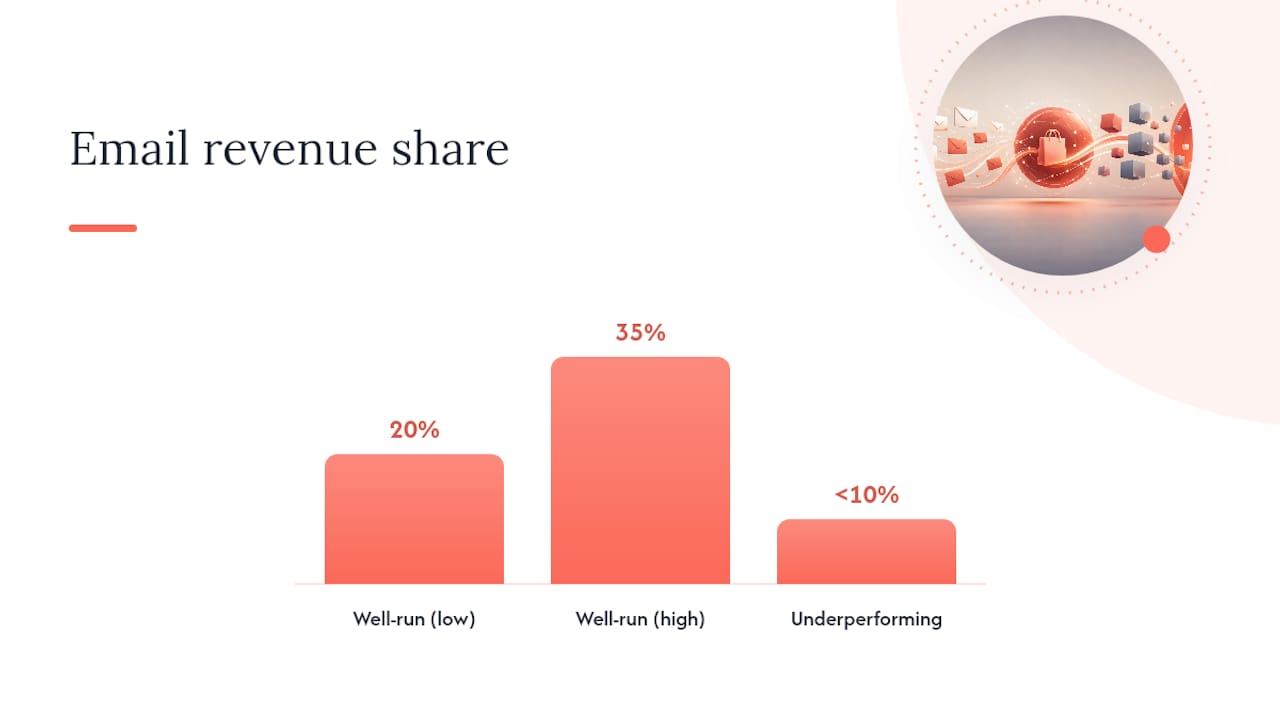
Email typically drives 20 to 35 percent of total revenue on a well-run ecommerce store, and a share sitting under 10 percent usually signals underdeveloped automation or a list health problem worth investigating.
What metrics should you track, and what’s a healthy benchmark?
Five metrics matter for judging flow health: open rate (percentage of recipients who opened), click-through rate (percentage who clicked a link), conversion rate (percentage who purchased), revenue per recipient (total flow revenue divided by recipients), and revenue per send (a broader efficiency measure across the whole flow).
| Metric | What it measures | Rough healthy range |
|---|---|---|
| Open rate | Subject line and sender reputation | Varies by flow, cart and welcome usually highest |
| Click-through rate | Content and CTA relevance | Higher on high-intent flows like cart abandonment |
| Conversion rate | Actual purchase completion | Cart abandonment typically outperforms other flows |
| Revenue per recipient | Overall flow efficiency | Abandoned cart usually leads all flows here |
| Email revenue share | Email’s role in total store revenue | 20–35% on well-developed programmes |
Klaviyo’s benchmark data consistently shows abandoned cart producing the highest revenue per recipient of any single automation, which is exactly why it belongs in the first build phase alongside welcome.
Reporting cadence matters as much as the metrics themselves: check trigger health daily (are emails actually firing, are there errors), review A/B tests weekly once you have enough volume to call a result, and assess overall revenue impact monthly against your broader retention goals. Moormarketing’s guide to ecommerce performance metrics covers the reporting structure in more depth if you’re building this out for the first time.
Automated flows can produce 70 to 80 percent of total email revenue despite representing a small share of total sends, which is the clearest argument for prioritising flow-building over campaign calendars when resources are limited.
Common mistakes that quietly drain automation revenue
These errors show up again and again across ecommerce accounts, and most of them are fixable within a week once you know what to look for.
- Discounting too early in a flow. Leading with a discount in email one of any sequence trains customers to wait for a deal rather than buy at full price.
- Running identical cart and browse abandonment content. Treating a soft browse signal the same as hard cart intent wastes the stronger flow’s urgency and annoys browsers with premature pressure.
- Separate tools firing duplicate offers. Without a shared customer profile, email and SMS can send conflicting promotions to the same person within hours of each other.
- Too many post-purchase asks stacked together. Hitting a customer with a review request and a cross-sell offer in the same 48 hours after delivery reads as tone-deaf rather than helpful.
- No frequency caps across flows. A customer can end up in three overlapping flows at once (welcome, back-in-stock, browse abandonment) with no cap stopping the pile-up.
Remediation steps, in order of priority:
- Audit every flow for a discount trigger and move any first-touch discount to a later stage in the sequence.
- Compare cart and browse abandonment templates side by side; if they’re near-identical, rebuild browse with lower urgency and different creative.
- Map every trigger across every channel and consolidate onto a shared customer profile where possible.
- Space post-purchase commercial asks at least five days apart from transactional messages.
- Set a hard cap of one automated email per customer per day, across all flows combined.
Quick wins to run this week: pull a report on which flows are currently live, check for any discount sitting in a first-touch email, and confirm your suppression rules actually stop a purchasing customer from receiving a cart abandonment email for that same product.
Moor Marketing’s six-point audit and launch checklist
Every flow audit Moormarketing runs for ecommerce clients comes back to six checks, in this order: data integrity, trigger logic, content and creative, suppression and frequency caps, integration and orchestration, and measurement.
- Data integrity — is the product feed accurate, is order data flowing cleanly, are customer profiles deduplicated?
- Trigger logic — does each flow fire on the right event, at the right delay, without double-firing?
- Content and creative — does copy match the intent level of the trigger, and does every template render properly on mobile?
- Suppression and frequency caps — does a purchase correctly remove a customer from the relevant abandonment flow, and is there a shared daily send cap?
- Integration and orchestration — do email, SMS and on-site messaging read from one customer profile, or are they operating independently?
- Measurement — is revenue per recipient tracked per flow, not just blended across the whole account?
| Audit item | Sign-off owner |
|---|---|
| Data integrity | Technical lead |
| Trigger logic | Technical lead |
| Content and creative | Creative lead |
| Suppression and frequency caps | Technical lead, reviewed by revenue lead |
| Integration and orchestration | Technical lead |
| Measurement | Revenue/marketing lead |
QA acceptance criteria worth setting before any flow launches: a test order must trigger the correct sequence within the expected delay window, a test unsubscribe must remove the profile from every active flow within 24 hours, and every template must pass a mobile render check on at least two device sizes.
Pro Tip: Run this six-point audit quarterly, not just at launch. Flows drift over time as product catalogues change, new channels get added, and teams turn over. A flow that passed QA a year ago can quietly develop trigger conflicts nobody notices until revenue per recipient starts sliding.
The single thing most brands get wrong with email flows
The most common mistake we see isn’t a missing flow. It’s treating every flow as a sales channel first and a customer experience second. Brands build a technically correct three-email cart sequence, then undo all of it by discounting in email one, or by sending a review request and a cross-sell offer within hours of a delivery confirmation.
The fix isn’t complicated, and it doesn’t require new software:
- Map every flow’s first message and check whether it leads with a discount. If it does, move the discount later.
- Check the gap between your delivery confirmation and your first commercial email. If it’s under 48 hours, add space.
- Look for any two flows that could fire on the same customer within the same day, and add a shared suppression rule.
- Ask whether each email’s content matches the actual intent level of the trigger, rather than reusing the same template across flows.
- Review your VIP and loyalty rewards for redemption friction. If it takes more than one click, simplify it.
Brands that fix sequencing and spacing issues without touching a single line of creative typically see the biggest lift in the flows that were already converting reasonably well. The gains come from removing friction and conflict, not from writing cleverer subject lines.
How Moor Marketing helps you build and audit ecommerce email flows
Moormarketing works alongside ecommerce teams as a hands-on partner, not an outsourced vendor, which means senior strategists actually build and audit your flows rather than handing the work to a junior account manager you never speak to.

What that looks like in practice:
- A full six-point flow audit covering data integrity, trigger logic, creative, suppression rules, orchestration and measurement.
- An implementation roadmap sequenced by quarter, so you’re not trying to launch ten flows at once with limited engineering resources.
- Ongoing optimisation once flows are live, including A/B testing priorities and channel coordination across email, SMS and on-site messaging.
If you’re weighing whether to build this in-house or bring in a partner, Moormarketing’s ecommerce marketing workshops give in-house teams direct mentoring on building and auditing flows themselves, while the ecommerce growth strategy engagement suits brands who want the audit, roadmap and ongoing optimisation handled directly. Either way, the next step is a conversation about where your flows currently stand and what’s costing you the most revenue right now.
Frequently asked questions
How many ecommerce email flows should a store have running?
Most established stores run somewhere between five and ten flows, covering welcome, abandoned cart, browse abandonment, post-purchase, review requests, replenishment, back-in-stock and VIP or milestone messaging. Start with the two highest-intent flows and expand as your data and resources allow.
What’s the difference between an email flow and an email campaign?
A flow triggers automatically from a specific customer action or event, like abandoning a cart or completing a purchase. A campaign is a scheduled, one-off send to a segment or your whole list, regardless of individual behaviour.
Should every abandoned cart flow include a discount?
No. The strongest structure keeps the first two emails discount-free and reserves a discount for the third message only if the customer still hasn’t converted. Leading with a discount in every cart flow trains shoppers to abandon on purpose.
How long should a welcome series run?
Most effective welcome series run three to five emails across seven to fourteen days, starting with an immediate incentive and ending with a last-chance reminder before the offer expires.
Can Klaviyo, Shopify and Omnisend all work together for flow management?
Yes. Shopify handles the underlying store and order data, while Klaviyo and Omnisend both build natively on that data to power triggered email and SMS flows. Syncing customer data, suppression rules and event tracking between them is what prevents duplicate or conflicting messages.
Sources
- Email Flows for Ecommerce That Increase Sales and Revenue
- 10 Email Marketing Automation Examples for 2026
- Recover lost sales with abandoned cart email strategies
- Ecommerce Email Marketing Playbook: 9 Flows for 2026
- Effective digital marketing channels for customer retention (Statista)