
Dayparting in digital advertising is the practice of scheduling ads to run only during specific hours and days when your audience is most active and most likely to convert. Known formally as ad scheduling, it concentrates your budget on peak performance windows rather than spreading spend across every hour of the day. Platforms including Google Ads, Meta, Amazon Ads, and TikTok each offer scheduling controls that let you restrict or weight delivery by time. When applied correctly, dayparting directly improves click-through rate, cost per acquisition, and return on ad spend. For eCommerce marketers, it is one of the most direct levers available for reducing wasted spend.
How dayparting works across major digital ad platforms
Dayparting restricts ad delivery by day and hour to focus budget on peak performance periods, and each major platform implements this control differently. Understanding those differences is what separates a schedule that saves money from one that quietly destroys campaign performance.
Google Ads operates ad scheduling at the campaign level. You set your schedule in the account’s nominated time zone, but ads are delivered according to the viewer’s local time. A schedule set for 9 AM to 5 PM Pacific Time will reach Eastern Australian viewers at a completely different point in their day. Campaign-level ad scheduling is supported even for automated campaign types including Performance Max, though the degree of control varies. Google also allows bid adjustments within schedules, so rather than switching ads fully off, you can reduce bids by a percentage during lower-performing windows and increase them during peak periods.

Meta handles dayparting through its ad set delivery settings, where you can choose “Run ads on a schedule” instead of continuous delivery. The catch is significant. Meta dayparting can improve CPA/ROAS temporarily but causes choppy learning and algorithm resets if delivery is restricted too aggressively or changed frequently. Meta’s algorithm depends on a steady flow of conversion events to optimise. Cutting hours starves that learning phase, particularly in smaller accounts with limited daily conversions.
Amazon Ads does not offer native dayparting controls in the same way Google does, but advertisers can use bulk operations or third-party tools to pause and resume campaigns on a schedule. Amazon shopper behaviour tends to peak in the evenings and on weekends, making manual scheduling worthwhile for high-spend campaigns.
TikTok Ads Manager offers dayparting at the ad group level, though the platform’s engagement patterns skew heavily toward evenings and late nights, particularly for younger demographics. TikTok’s algorithm is highly sensitive to delivery interruptions, so aggressive scheduling can reduce reach efficiency.
| Platform | Scheduling level | Bid adjustment support | Algorithm sensitivity |
|---|---|---|---|
| Google Ads | Campaign | Yes, percentage-based | Moderate |
| Meta Ads | Ad set | No (on/off only) | High |
| Amazon Ads | Campaign (via tools) | Limited | Moderate |
| TikTok Ads | Ad group | No (on/off only) | High |
Pro Tip: On Google Ads, use bid adjustments rather than hard on/off scheduling wherever possible. A 40% bid reduction during low-converting hours keeps your ads eligible for unexpected conversions without burning full budget.
How to read hourly data and identify your best windows
The most common dayparting mistake is scheduling based on intuition rather than data. Most marketers assume their customers shop during business hours. The data frequently disagrees.
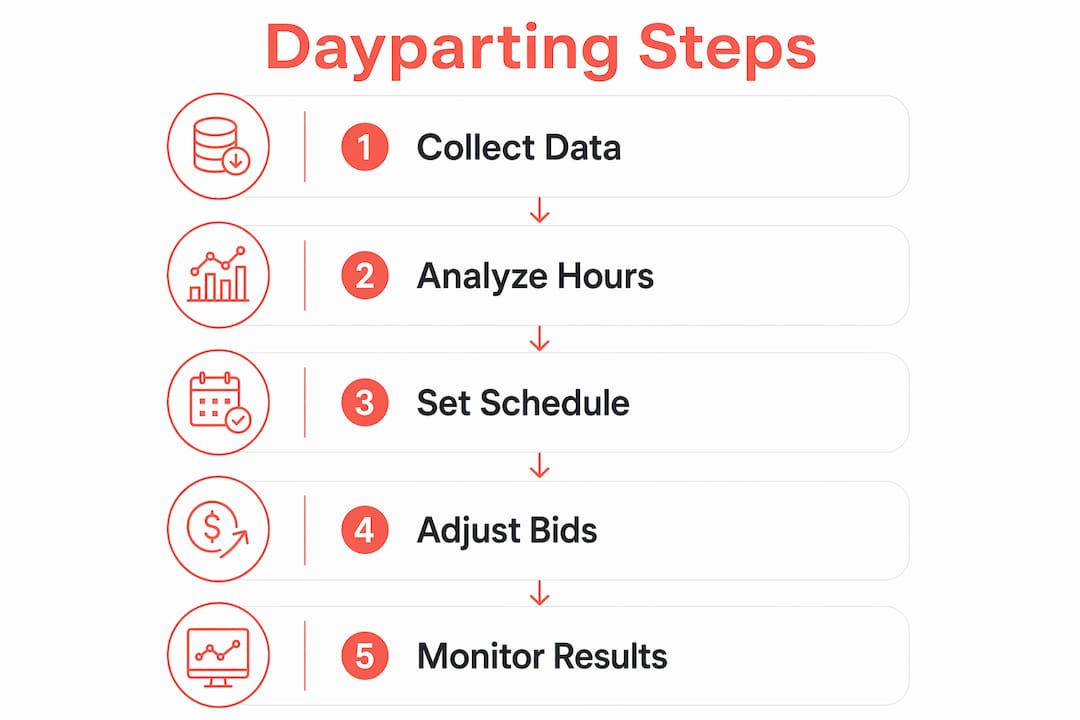
Start with Google Ads reports. Navigate to the “When: Day and Hour” report under the Dimensions tab to see performance broken down by hour of day and day of week. Focus on conversions and cost per conversion, not clicks. Optimising dayparting on conversions rather than clicks aligns your schedule with revenue outcomes rather than traffic patterns, which is the only metric that matters for eCommerce.
Follow this process to build a reliable schedule:
- Run campaigns broadly for at least four to six weeks. Collect unbiased hourly data across all days before drawing any conclusions. Starting broad over weeks to collect unbiased performance data before narrowing to peak hours is the validated approach for eCommerce campaigns.
- Sort by cost per conversion, not volume. A high-traffic hour with a poor conversion rate is a budget drain. Identify the hours where cost per conversion is lowest and conversion rate is highest.
- Look for consistent patterns across multiple weeks. A single week of data can be skewed by promotions, seasonality, or platform anomalies. Patterns that repeat across three or more weeks are reliable.
- Map your findings against your operational hours. If your customer service team handles post-purchase queries during business hours, there is a strong case for maintaining presence during those windows even if conversion rates are slightly lower.
- Build your initial schedule around your top two or three performing windows. Resist the urge to create a dozen narrow time slots immediately. Complexity at this stage creates more problems than it solves.
Pro Tip: Export your hourly data to a spreadsheet and apply conditional formatting to highlight the top and bottom quartiles by cost per conversion. The visual pattern makes scheduling decisions far clearer than reading raw numbers.
What are the biggest challenges in dayparting?
Time zone misalignment is the most common and most costly dayparting error. Google Ads accounts require schedule stretching or campaign splitting to accommodate multiple time zones effectively in multi-region eCommerce campaigns. If your account is set to Sydney time and you are targeting Melbourne, Brisbane, Perth, and Auckland simultaneously, a single schedule will not align with peak hours across all those markets.
The practical solutions are:
- Widen your schedule to cover the earliest start and latest end across all target time zones. This is simpler but means some budget runs during off-peak hours in some regions.
- Split campaigns by region. Create separate campaigns for each major time zone, each with its own schedule calibrated to local peak hours. This is more work but delivers far greater precision.
Time zone errors lead to ads running outside peak converting hours, which is a direct and measurable source of wasted spend. For Australian eCommerce businesses targeting both domestic and New Zealand audiences, even a two-hour time difference requires deliberate schedule adjustment.
Frequency capping adds another layer of complexity. In combined dayparting and frequency capping strategies, impression timing inside daypart windows is critical. If your frequency cap resets daily and your daypart runs only four hours, users can hit their impression limit before your highest-converting window even begins. Coordinate your frequency settings with your schedule to avoid exhausting reach before peak periods.
Algorithm disruption is the third major challenge. Running dayparting too early or aggressively narrows delivery, increases data variance, and triggers re-learning that temporarily reduces campaign performance. This is particularly acute on Meta and TikTok, where machine learning cycles depend on consistent conversion signals. Abrupt schedule changes reset that learning, often wiping out weeks of optimisation progress.
Practical steps to implement dayparting in eCommerce campaigns
Setting up dayparting correctly from the start avoids the most common performance pitfalls. Here is a repeatable process for eCommerce campaigns across Google Ads and Meta.
- Audit your existing campaign data first. Before touching any schedule settings, pull at least 30 days of hourly performance data. If your campaign is newer than that, wait. Setting up Google Ads dayparting involves analysing hourly conversions, identifying peak periods, and creating schedules in 15-minute increments before refining with bid adjustments.
- Create your initial schedule in Google Ads. Go to Campaign Settings, select “Ad Schedule,” and add time blocks based on your data analysis. Start with your top performing hours and apply a modest bid increase of 15 to 20 percent rather than excluding all other hours entirely.
- For Meta, use “Run ads on a schedule” at the ad set level. Select your account time zone and map your schedule to the viewer’s local time manually. Keep your initial schedule broad, covering at least 14 hours per day, to avoid starving the algorithm.
- Align your schedule with your purchase funnel. If you run a live chat or phone support service during specific hours, weight your budget toward those windows. Customers who can get immediate answers convert at higher rates.
- Review and adjust on a fortnightly cadence. Do not set and forget. Check your hourly reports every two weeks and make incremental adjustments. Avoid changing more than two or three time blocks at once to prevent triggering a full algorithm reset.
- Use automation tools for ongoing management. Google Ads scripts, third-party platforms, and custom business intelligence dashboards can automate bid adjustments and flag anomalies in hourly performance. This is particularly valuable for eCommerce retargeting campaigns where timing relative to the purchase window is critical.
For advertisers managing campaigns across multiple platforms, aligning schedules with paid media management principles that account for geographic and time zone profiles significantly improves overall ROI.
Key takeaways
Dayparting works because it concentrates ad budget on the hours and days where conversion rates are highest, reducing wasted spend and improving return on ad spend across Google Ads, Meta, Amazon Ads, and TikTok.
| Point | Details |
|---|---|
| Start with data, not assumptions | Run campaigns broadly for four to six weeks before narrowing schedules to peak conversion windows. |
| Platform differences matter | Google Ads supports bid adjustments; Meta and TikTok use on/off scheduling with higher algorithm sensitivity. |
| Time zones require active management | Multi-region campaigns need schedule stretching or campaign splitting to align with local peak hours. |
| Frequency capping interacts with scheduling | Coordinate impression caps with daypart windows to avoid exhausting reach before high-converting hours. |
| Iterate slowly and deliberately | Change two to three time blocks at a time on a fortnightly cadence to avoid triggering algorithm re-learning. |
Why I still back dayparting even in an automated bidding world
There is a persistent argument in digital advertising circles that smart bidding and machine learning have made manual scheduling redundant. I disagree, and I have seen the data to back that position across dozens of eCommerce accounts.
Automated bidding is excellent at adjusting bids in real time based on signals. What it cannot do is override the reality that some hours are structurally unprofitable for your specific business. If your eCommerce store sells products that require a considered purchase decision and your customer service team finishes at 6 PM, running full-budget campaigns at midnight is not a bidding problem. It is a scheduling problem.
The mistake I see most often is marketers implementing dayparting too early, before they have statistically meaningful data, and then abandoning it when performance dips during the algorithm re-learning phase. That dip is expected. It is not evidence that dayparting does not work. It is evidence that the schedule was applied before the data was ready.
My advice is to treat dayparting as a long-term structural decision rather than a quick fix. Build your schedule on at least six weeks of clean data, make changes in small increments, and give the platform two full weeks to stabilise after each adjustment. The impact of dayparting compounds over time when it is applied with patience. The marketers who get the most from it are the ones who resist the urge to over-engineer it in the first month.
— Liza
Take your ad scheduling further with Moormarketing

Dayparting is one component of a broader digital advertising strategy that, when executed correctly, compounds results across every campaign you run. Moormarketing’s eCommerce marketing workshops are built specifically for marketers and business owners who want to move beyond surface-level tactics and into the kind of data-driven scheduling, bidding, and targeting decisions that drive real revenue growth. The workshops cover practical campaign optimisation techniques including ad scheduling, platform-specific nuances, and multi-region targeting strategies. Every session is led by senior strategists, not junior staff, and is grounded in frameworks that have delivered results including $3 million per month for a global furniture brand. If you are ready to work with specialists who treat your ad budget with the same rigour they apply to their own, this is the right next step.
FAQ
What is dayparting in digital advertising?
Dayparting, also called ad scheduling, is the practice of restricting ad delivery to specific hours and days when your audience is most likely to convert. It is implemented through platform schedule controls in Google Ads, Meta, Amazon Ads, and TikTok.
How do I know which hours to target with dayparting?
Pull at least four to six weeks of hourly performance data from your ad platform and sort by cost per conversion rather than clicks. Consistent patterns across multiple weeks indicate reliable peak windows worth scheduling around.
Does dayparting work with automated bidding in Google Ads?
Yes. Campaign-level ad scheduling is supported even for automated campaigns in Google Ads, allowing schedule control alongside smart bidding. Use bid adjustments within your schedule rather than hard on/off switching for best results.
What is the biggest risk of dayparting on Meta?
Meta dayparting risks algorithmic re-learning if schedules are changed abruptly or delivery is restricted too aggressively. Keep initial schedules broad and make incremental changes to protect the algorithm’s learning phase.
How do I handle dayparting across multiple time zones?
Either widen your schedule to cover the earliest and latest peak hours across all target regions, or split campaigns by time zone so each has its own precisely calibrated schedule. Multi-region campaigns without adjustment consistently result in ads running outside peak converting hours in at least one market.