
If your Google Ads aren’t converting, the cause is almost always one of three things: broken conversion tracking, a landing page that doesn’t match what the ad promised, or keywords pulling in the wrong searchers. Tracking failures are the most common single culprit, so that’s where you check first, before touching bids or budgets.
Your next move, right now: open Google Ads, go to Goals > Conversions > Summary, and check the status column. If it says “No recent conversions” or “Needs attention,” you’ve likely found your answer already.
Before changing anything else, run through this in order:
- Confirm conversion tracking status in Google Ads (Active, Needs attention, or Misconfigured)
- Check your top landing page for message match and load speed
- Pull the Search Terms report and scan for irrelevant queries eating your budget
Key Takeaways
Most Google Ads accounts that show zero conversions are suffering from broken tracking or landing page mismatch, not a fundamentally flawed targeting or bidding strategy.
| Point | Details |
|---|---|
| Check tracking status first | Open Conversions > Summary before touching bids, budgets, or keywords. |
| Verify with a real test | Click your own ad, complete a conversion, and confirm it appears in GA4 Realtime. |
| Clean search terms weekly | Pull the Search Terms report and build negative keyword lists to cut wasted spend. |
| Fix landing pages before scaling budget | Message match, mobile speed, and a single CTA often outperform a bigger budget. |
| Get a structured audit | Moormarketing’s audit prioritises fixes by impact so you stop guessing what to change next. |
Table of Contents
- Why is Google Ads not converting? A 5-minute diagnostic
- Common reasons Google Ads campaigns fail to convert
- How to verify your Google Ads conversion tracking is working
- Fixing your landing page when clicks aren’t converting
- Are your keywords bringing in the wrong searchers?
- Could your budget or bids be limiting conversions?
- When should you pause a keyword or campaign?
- Why do Ads, GA4 and your CRM show different numbers?
- A recent example: from zero data to a working funnel
- The 10-point checklist to run before anything else
- Get a prioritised fix list instead of guessing
- Frequently asked questions
- Sources
Why is Google Ads not converting? A 5-minute diagnostic
Run this before you touch strategy. It tells you whether you have a real conversion problem or just a measurement problem.
- Open Conversions > Summary in Google Ads and check the status of your primary conversion action.
- Install Google Tag Assistant and load your site to confirm the conversion tag fires on the right page.
- Submit a test conversion yourself, then check GA4 Realtime to see if it registers within a few minutes.
- Pull the Search terms report for the last 30 days and scan the top 20 queries by spend.
- Load your top-spending landing page on mobile and time it. Anything over three seconds is a problem.
Pro Tip: Test with a fresh incognito session and a real click on your ad, not a direct URL visit. Direct visits skip the GCLID parameter, so they won’t reveal tagging issues tied to actual ad clicks.
Google’s own conversion tracking troubleshooter walks through each status flag if you get stuck, and it’s worth bookmarking for future audits.
Common reasons Google Ads campaigns fail to convert
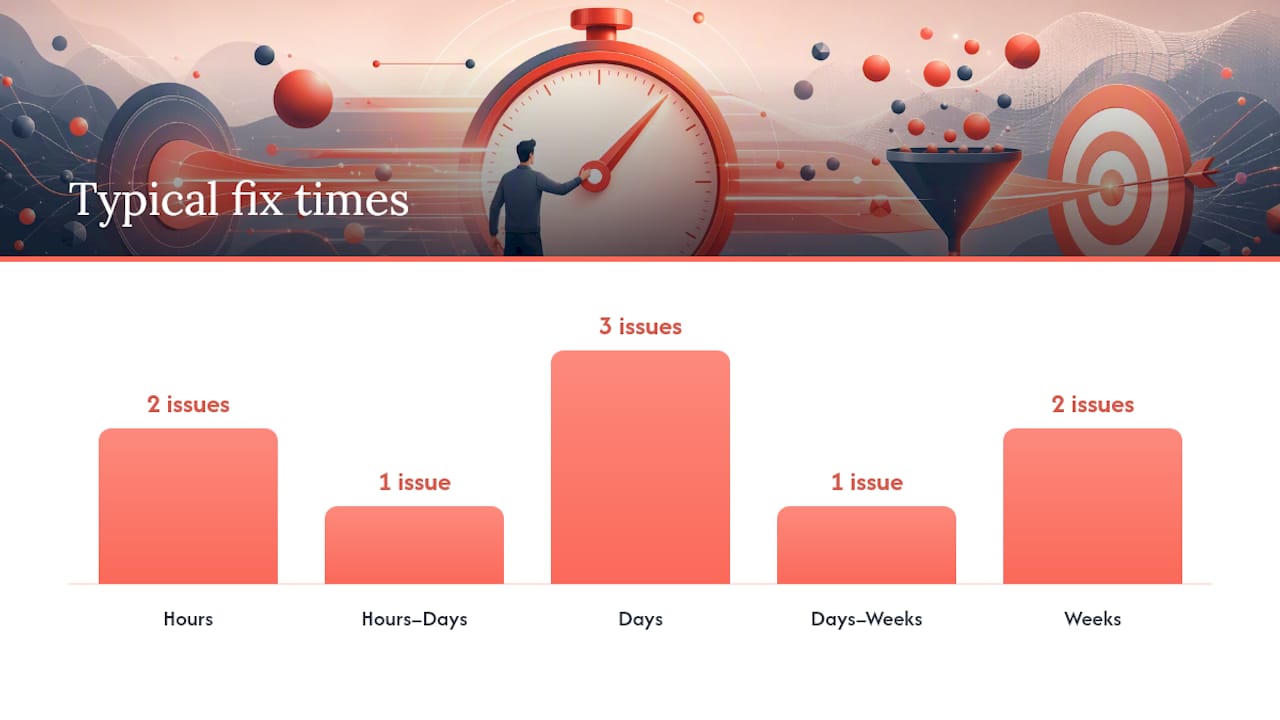
Most non-converting accounts trace back to a handful of repeat offenders. Here’s the shortlist, roughly in order of how often we see them:
- Broken or missing conversion tracking — tag fires on the wrong page, or the primary conversion isn’t selected. Fix: hours, using Tag Assistant.
- Landing page mismatch — the ad promises one thing, the page delivers another. Fix: hours to days, needs a designer or developer for structural changes.
- Keyword intent mismatch — broad match pulling in research-stage or unrelated searches. Fix: days, using negative keywords.
- Weak ad copy — clicks come from people who aren’t pre-qualified for the offer. Fix: days.
- Budget too low for the auction — impressions capped before enough data accumulates. Fix: days to weeks.
- Bids set too conservatively — ads rank low, so only cheap, low-intent traffic clicks through. Fix: days.
- Poor location or scheduling targeting — spend going to areas or hours with no buyer intent. Fix: hours.
- Still in the learning period — Smart Bidding strategies typically need one to two weeks and a decent volume of conversions to stabilise.
- Low Quality Score — pushes up cost per click and limits visibility for the same budget. Fix: weeks, needs ad copy and landing page work together.
- Technical site issues — broken checkout, slow mobile load, form errors. Fix: hours to weeks depending on whether it needs developer input.
WordStream’s breakdown of ten common causes lines up closely with what we see across client accounts: timing, tracking and landing pages account for the bulk of “zero conversion” panics, not the auction itself.
Anything involving a CRM import, offline conversion upload, or server-side tagging will need developer time. Flag those early rather than losing a week trying to fix them through the Ads interface alone.
How to verify your Google Ads conversion tracking is working
This is the step most people skip, and it’s the one that resolves the majority of “why aren’t my Google Ads converting” cases on its own. Broken tracking looks exactly like a genuine conversion drought from the campaign dashboard.
- Open Conversions > Summary and check the status against each conversion action.
- Run Google Tag Assistant on your key pages to confirm the tag exists and fires at the right moment, not before the page loads or after a bounce.
- Click your own ad using a device with ads enabled, note the GCLID in the URL, complete the conversion action, then check both GA4 Realtime and the Ads interface a few hours later.
- If you use Google Tag Manager, open the GTM debug console and confirm the conversion trigger matches the actual page URL and event, not a similarly named one from an old campaign.
Google Ads assigns one of five statuses to each conversion action: Active (working normally), Needs attention (a warning, usually a drop in volume or a tag issue), Misconfigured (the tag has a technical problem), Awaiting conversions (correctly set up but hasn’t recorded one yet), or Removed. Google’s guide on fixing common conversion measurement issues covers the primary conversion selection step that trips up a surprising number of automated campaigns.
Pro Tip: If you’re on iOS traffic or running Consent Mode, expect some conversion undercounting from modelled data. It’s not a bug. Check Tag Assistant’s unverified status guide before assuming the tag itself is broken.
Duplicate tags firing on the same page, or a tag scoped to the wrong URL after a site redesign, are the two pitfalls we catch most often during audits.
Fixing your landing page when clicks aren’t converting
A landing page that doesn’t match the ad is the second most common reason paid clicks go nowhere. The checklist here is short on purpose:
- Message match: the headline should repeat the exact promise made in the ad, not a rephrased version of it.
- Single purpose: one offer, one call to action, no competing links to other products or blog posts.
- Remove navigation: a full site menu on a landing page gives visitors an exit ramp before they convert.
- Mobile usability: most paid traffic lands on a phone. Test the actual form on a real device, not just desktop preview.
- Speed under three seconds: anything slower and you lose a meaningful chunk of visitors before the page even renders.
- Visible, singular CTA: one button, repeated if the page is long, never buried below three scrolls.
Track bounce rate, time on page, conversion rate by landing page, and the mobile-versus-desktop split separately. A page converting well on desktop but dying on mobile points to a UX problem, not a targeting one.
Pro Tip: Build one landing page per ad group, not one for the whole campaign. It’s more setup work upfront, but message match alone can lift conversion rate faster than any bid change. Our guide to landing pages that convert covers the structural side in more depth, and Hangr’s Shopify CRO guide is a solid reference if you’re running product pages as landing pages.

Shortening a form from seven fields to three, or swapping a vague headline for the ad’s exact phrase, tends to show measurable movement within days, not weeks.
Are your keywords bringing in the wrong searchers?
Pull your Search Terms report and sort by spend, not clicks. You’re looking for queries that cost money but were never going to convert, regardless of how good the landing page is.
- Informational queries (“what is,” “how does,” “diy”) signal research-stage traffic, not buyers.
- Job-seeker terms (“careers,” “jobs at,” “salary”) show up more often than you’d expect on broad match.
- Free or discount hunters (“free,” “cheap,” “coupon”) if your offer isn’t actually free or heavily discounted.
- Competitor brand names, unless you’re deliberately running a competitor conquesting campaign.
Broad match can work, but only with a strict, regularly maintained negative keyword list sitting underneath it. Phrase and exact match give you tighter control with less maintenance, at the cost of some volume. Review search terms weekly for the first month on any new campaign, then monthly once the account settles. HeyOz’s analysis of why campaigns fail makes the case that negative keyword hygiene alone separates accounts that convert from ones that just burn spend.
Could your budget or bids be limiting conversions?
Auction mechanics matter more than most advertisers assume. A budget too small to compete simply means your ads don’t show often enough to gather the data needed for conversions in the first place.
- Check Impression Share Lost (Budget) in the campaign metrics. Above 20% usually means budget, not targeting, is your ceiling.
- If you’re new or diagnosing a problem, run Manual CPC or Maximise Clicks for a week to gather clean click and search-term data before switching to Target CPA or Target ROAS.
- Review location settings — “Presence” versus “Presence or interest” can quietly send spend to people outside your service area.
- Check ad scheduling and device bid adjustments against when your actual conversions happen, not when you assume they happen.
Our piece on how ad auction systems work breaks down the Ad Rank formula if you want the mechanics behind why low bids sometimes produce zero impressions rather than just fewer clicks.
When should you pause a keyword or campaign?
Pausing too early is one of the most expensive mistakes in Google Ads. It resets Smart Bidding’s learning and throws away data you’ll need again later.
- Set a minimum threshold before judging anything: at least 100 clicks or 15 to 20 conversions on the action you’re measuring, whichever comes first.
- If you’re below that threshold, wait. Don’t tweak.
- If you’re at threshold with no conversions, make one change (landing page, keyword, or bid) and reset the clock.
- Only pause if a second full threshold period, after a genuine fix, still shows nothing.
Pro Tip: Keep a simple change log, date, what changed, why. Six months from now when someone asks “why did conversions dip in March,” you’ll have the answer in one line instead of re-auditing the whole account.
Changing the final URL or swapping the conversion action resets learning. Editing ad copy or adjusting bids usually doesn’t.
Why do Ads, GA4 and your CRM show different numbers?
This confuses more advertisers than any other issue on this list, and it’s rarely a sign anything is actually broken.
Google Ads reports conversions by click date, while GA4 and most CRMs report by conversion date. A sale that closes three weeks after the click shows up in Ads against the original click date, but in your CRM against today. Google’s own documentation on large data discrepancies confirms lookback windows of up to 90 days can explain gaps that look alarming on the surface.
Run this reconciliation before assuming data is missing:
- Compare Ads, GA4, and CRM totals over the same rolling 30 day window, not the same calendar month.
- Check your conversion window and lookback settings match across platforms.
- Look for view-through conversions inflating one platform but not another.
- If offline sales close the loop, import GCLID-tagged conversions back into Ads manually.
A recent example: from zero data to a working funnel
We picked up an account for a growth-stage retailer where the client swore Google Ads “just didn’t work” for their product. The conversion action had been misconfigured after a checkout platform migration three months earlier, meaning every reported conversion since then was effectively zero, despite real sales happening on the site.
The first three fixes: repairing the conversion tag and confirming status showed Active, building dedicated landing pages per ad group instead of sending all traffic to the homepage, and cutting a negative keyword list that removed close to a third of wasted spend within the first week.
Conversions started registering accurately within days of the tracking fix alone, before any creative or bid changes were made. Full details sit in our Google Ads case study if you want the breakdown.
The 10-point checklist to run before anything else
- Confirm conversion action status shows Active in Google Ads.
- Run Tag Assistant on your key pages.
- Complete a real test conversion and check GA4 Realtime.
- Pull 30 days of search terms and flag irrelevant queries.
- Load your landing page on mobile and time it.
- Confirm message match between ad copy and headline.
- Check Impression Share Lost due to budget.
- Review location and ad scheduling settings.
- Compare Ads, GA4 and CRM totals over the same window.
- Import any offline conversions tied to GCLID.
What we see most in audits
Two mistakes repeat constantly: teams adjust bids for weeks without ever confirming tracking works, and accounts run 40 ad groups pointing at two generic landing pages. Check measurement and message match before touching anything else.
Get a prioritised fix list instead of guessing
If you’ve worked through the checklist above and you’re still not sure what to fix first, that’s exactly the gap Moormarketing closes. We run a structured audit rather than a general “review,” so you get a prioritised, sequenced list of fixes instead of a wall of observations you have to interpret yourself.

The audit covers conversion tracking verification, a full search-terms clean-up, quick landing page fixes, and a written action plan ranked by expected impact and effort. Because our senior strategists handle every account directly, nothing gets handed off to a junior team member halfway through diagnosis. If you want to see what this looks like in practice, our ecommerce growth guide walks through the broader framework we use across paid channels. Ready to find out what’s actually holding your account back? Book a call with our team and get a plan built around your account, not a generic template.
Frequently asked questions
Why is Google Ads showing clicks but no conversions?
Usually tracking, not targeting. Check whether your conversion action status reads Active, Needs attention, or Misconfigured before assuming your audience is wrong.
How long should I wait before pausing a keyword?
Wait until you’ve got roughly 100 clicks or 15 to 20 conversions on the action you’re measuring. Pausing earlier than that means you’re deciding on noise, not data.
Can a slow landing page really stop conversions?
Yes. Load time past three seconds on mobile is one of the fastest ways to lose paid traffic before it ever sees your offer.
Does Quality Score directly cause low conversions?
Not directly, but a low Quality Score raises your cost per click and limits visibility, which shrinks the volume of qualified traffic reaching your landing page.
Why do my Google Ads numbers not match Google Analytics?
Ads reports by click date, GA4 by conversion date. A lag of days or weeks between click and sale explains most of the gap.
Sources
- Troubleshooting conversion tracking status – Google Ads Help
- Google Ads not converting? 10 reasons (& solutions) – WordStream