
For measurable results, prioritise data grounding over elaborate bot personalities. Set up a retrieval-augmented generation (RAG) pipeline that pulls from session behaviour and persistent customer profiles, run it on one commerce or support use case, then expand into lifelong memory once the numbers hold up.
That ordering matters because the evidence points one way: shoppers keep coming back to a chatbot because it’s useful and pleasant to deal with, not because it has a catchy name or a scripted personality. A study of 475 users testing few-shot-trained chatbot identities found perceived usefulness and enjoyment predicted future use. Identity congruity, the fit between the bot’s persona and the brand, made no measurable difference.
Here’s what that means for the next quarter of work:
- Ground responses in live catalogue and CRM data before touching persona or tone
- Pick one product page or one support flow as your pilot, not the whole site
- Define a single KPI upfront (conversion from chat, ticket resolution rate, or cart recovery)
- Layer in lifelong memory only after the pilot proves session-level personalisation earns its keep
Skip the temptation to build a fully-branded chatbot character before you’ve proven the thing can answer a customer’s real question with the right stock level and the right price.
TL;DR:
- Building a successful personalized chatbot requires grounding responses in live catalog, CRM data, and session context before focusing on personality or tone.
- Focus on practical data layers and retrieval accuracy, as weak retrieval, stale embeddings, or poor chunking cause false answers, not personality depth.
- Proactive preference elicitation and session memory significantly reduce cold-start friction and increase session length and repeat interactions.
- Launch pilots on a limited use case with clear KPIs, gradually expand, and ensure data quality, escalation rules, and review processes are established beforehand.
- Measurable success hinges on usefulness and enjoyment, with technical metrics and business KPIs tracking retrieval precision, personalization accuracy, and conversion impact.
Table of Contents
- What is AI chatbot personalisation and why does it outperform generic bots?
- How do you architect data for personalised chatbot responses?
- Which personalisation techniques deliver the best return?
- What does a chatbot personalisation pilot checklist look like?
- How do you measure whether a personalised chatbot is working?
- What privacy and governance rules apply to chatbot memory?
- Why brief Moormarketing for chatbot personalisation
- Key Takeaways
- An editorial take on where personalisation projects go wrong
- Sources
What is AI chatbot personalisation and why does it outperform generic bots?
AI chatbot personalisation is the practice of tailoring a chatbot’s responses to an individual using session behaviour, stored profile data, and real-time product or policy information, rather than serving the same scripted answer to everyone. It’s the difference between a bot that says “we have shoes in various sizes” and one that says “the size 9 you looked at yesterday is back in stock, and it pairs well with the jacket you added to your wishlist.”
The research backing this is more specific than most vendor pitches suggest. Researchers built chatbot identities using few-shot learning and tested how convincingly customers could distinguish them from one another. The identities worked. Customers could tell them apart. But the ScienceDirect study found that distinguishability alone didn’t drive repeat use. Perceived usefulness and perceived enjoyment did the heavy lifting, mediating the whole relationship between chatbot design and whether someone would come back.
On the ground, three outcomes show up repeatedly when personalisation is grounded in real data:
- Conversion and engagement lift when responses reference the specific product a shopper is viewing, not a generic catalogue blurb
- Session length and repeat interaction both increase when a bot remembers context from earlier in the same visit
- Cold-start friction, the awkward first few exchanges before a bot knows anything about a new visitor, drops sharply when the system uses proactive preference elicitation instead of waiting passively for signals
The core finding to build a roadmap around: usefulness and enjoyment, not identity depth, are what decide whether a customer chats with your bot again.
On that last point, a profile customisation approach called PersonalAgent demonstrated that asking a handful of well-placed questions early in a conversation, rather than inferring everything silently, improved preference inference accuracy and made behaviour more consistent across sessions. That’s a cheap fix for an expensive problem. Most bots either ask nothing and guess wrong, or ask everything upfront and lose the customer before the second sentence.
The practical implication for decision-makers: fund the plumbing (data access, retrieval quality, profile persistence) ahead of the personality work. A chatbot with a mediocre voice and accurate stock data will outperform a charming one that gets pricing wrong.
How do you architect data for personalised chatbot responses?
Three data layers feed every genuinely personalised response, and skipping any one of them is where most projects fail. The first is session context: what the customer has clicked, searched, or added to cart in the last few minutes. The second is the persistent profile, held in a CDP or CRM, covering purchase history, stated preferences, and loyalty tier. The third is live catalogue and policy data, meaning current stock, pricing, shipping rules, and return windows pulled straight from the source of truth, not a stale export from last month.
Retrieval-augmented generation is the architecture pattern that stitches these three layers into a single response. Instead of asking a large language model to answer from memory, a RAG system retrieves the most relevant chunks of data (a product spec, a return policy clause, a customer’s last three orders) and feeds them into the prompt alongside the question. The model then generates an answer grounded in that retrieved material rather than guessing. Implementation guides for ecommerce teams treat this three-layer, RAG-backed structure as the baseline architecture, not an advanced option.
Four components make up a working RAG pipeline:
- A vector database that stores embeddings of your product catalogue, help articles, and policy documents
- A retriever that searches that database for the chunks most relevant to the customer’s question
- Filtering logic that applies business rules (don’t recommend out-of-stock items, respect regional pricing) before anything reaches the model
- Prompt augmentation that inserts the retrieved, filtered content into the model’s context window alongside the customer’s message and session history
Each piece exists to solve a specific failure. Without the vector database, you’re back to keyword search, which misses paraphrased questions. Without filtering, the model will happily recommend a product that’s been discontinued for six months. Without prompt augmentation done properly (clear delimiters, concise chunks, not a wall of raw JSON), the model gets confused about what’s fact and what’s conversation.
For Shopify stores specifically, Theme App Extensions let you embed a contextual assistant directly on the product page, with control over starter prompts, visual theming, and whether chat history persists across visits. That’s a meaningfully different experience to a generic site-wide widget bolted onto every page regardless of context. Dori is one example of a Shopify-focused assistant built on this pattern, auto-syncing the store’s catalogue and supporting add-to-cart directly from the chat window.

Pro Tip: Set your embedding refresh cadence to match how often your catalogue actually changes. A store with weekly stock turnover needs near-real-time refresh, but a boutique with a stable 200-SKU range can run on a daily batch job and save on infrastructure cost.
The failure modes worth planning around before launch: poor chunking (splitting a product description mid-sentence so the model retrieves half a fact), stale embeddings (the vector index wasn’t refreshed after a price change), and weak retrieval precision (the retriever pulls back plausible-sounding but wrong content because the similarity search wasn’t tuned). All three produce the same symptom, a bot confidently stating something false, and all three are fixed at the data layer, not by tweaking the prompt.
Which personalisation techniques deliver the best return?
Not every personalisation technique deserves equal investment. Some pay for themselves in the first month; others are nice polish you add once the fundamentals are solid. Here’s the toolbox in the order most teams should tackle it.
-
Session-level intent classification. Work out early in the conversation whether the customer wants product discovery, order support, or a policy answer, and route accordingly. This alone cuts down on generic non-answers because the bot isn’t trying to serve three intents with one script.
-
On-page product grounding. When the bot knows exactly which page the customer is viewing, it can answer “does this come in blue” without asking the customer to repeat the product name. This is the single highest-leverage session technique for commerce, and it’s the one Theme App Extensions are built to support.
-
Temporary session memory. Carry context (items viewed, questions already asked) across a single visit so the customer never has to repeat themselves within one session. This is table stakes, not an advanced feature, and its absence is one of the most common customer complaints about chatbots.
-
Unified profile construction for lifelong memory. Combine implicit signals (how long someone dwells on a page, sentiment in their messages, how often they return) with explicit signals (stated preferences, size, style) into one profile that persists across visits. A reinforcement-learning-based chatbot prototype tested exactly this combination and reported consistent gains in personalisation accuracy and satisfaction when both signal types fed the same profile, rather than relying on one or the other.
-
Proactive elicitation for cold-start customers. Rather than waiting passively for a new visitor to reveal preferences through behaviour alone, ask one or two low-friction micro-questions early (“looking for yourself or a gift?”) and offer a small incentive, like a discount code, for completing a short preference quiz. This is the fastest fix for the awkward first-visit experience, and it’s the same mechanism the PersonalAgent research found effective for reducing cold-start friction.
-
Retention policy design for long-term data. Decide upfront how long implicit and explicit signals live in the profile before they expire or need re-confirmation. Preferences from eighteen months ago (a size, a colour palette) may no longer be accurate, and treating them as permanent fact is a quiet source of bad recommendations.
-
Persona and tone, applied last. Persona has a real role, mainly in brand fit and tone consistency across channels, but it should be layered on top of a system that’s already proving useful, not used to compensate for one that isn’t. This is the ordering the identity-matching research supports directly: usefulness and enjoyment predict return use, persona congruity doesn’t move the needle on its own.
Pro Tip: Run a two-week test where the only change is turning on session memory, nothing else. Teams often skip straight to full lifelong profiles and never learn how much of the lift came from the cheap, fast win they could have shipped first.
The trade-off to watch: every layer of personalisation you add increases the surface area for something to break, a stale profile field, a misfiring intent classifier, a persona that clashes with a support escalation. Build in that order, and you’ll know exactly which layer to check when something goes wrong instead of debugging the whole stack at once.
What does a chatbot personalisation pilot checklist look like?
A pilot succeeds or fails based on decisions made before a single line of code gets written. Work through these in sequence.
-
Scope one use case and define success upfront. Pick a single product category page or one support flow (returns, sizing, order status). Name the audience segment you’re testing on, and write down the KPI target before you build anything, not after you see the results.
-
Map the exact data you need. List the specific APIs and payloads: catalogue feed, inventory levels, order history endpoint, CDP profile fields. Decide your embedding strategy (which fields get vectorised, how chunks are sized) and how often the catalogue sync runs.
-
Build the retrieval and prompt layer. Stand up the vector database, write the retriever’s filtering rules (stock status, regional availability, price bands), and draft prompt templates that clearly separate retrieved facts from conversation history. Build fallback responses for when retrieval comes back empty or low-confidence, so the bot says “let me connect you with support” instead of guessing.
-
Test before anyone outside the team sees it. Run persona QA (does the tone match brand guidelines), hallucination checks (feed it edge-case questions and verify it doesn’t invent stock or pricing), and synthetic persona runs, simulated conversations across a range of customer types, to surface gaps before real customers do. Put a staff member in the loop for the first batch of live conversations.
-
Roll out in phases, not all at once. Start with an A/B test against a control group seeing your existing experience. Expand gradually as the data supports it, and build a feedback loop, a simple weekly review of flagged conversations, so the iteration cadence doesn’t stall once the initial excitement fades.
Practical inputs that trip teams up if left until late:
- Confirm who owns catalogue data quality before launch. A pilot grounded in a messy product feed will surface every gap in your master data
- Agree on escalation rules for when the bot should hand off to a human, before the first customer hits that edge case
- Set a review cadence (weekly for the first month, then fortnightly) for checking flagged and low-confidence responses
- Decide who signs off on scaling the pilot to a second use case, and what threshold triggers that decision
The Facebook social media marketing strategy Moormarketing runs for eCommerce clients follows the same phased logic: prove the mechanism on a narrow slice of traffic before committing budget to a full rollout.
How do you measure whether a personalised chatbot is working?
Three tiers of metrics matter, and conflating them is a common mistake. Business KPIs tell you if it’s worth the investment. Engagement KPIs tell you if customers like the experience. Technical KPIs tell you if the system is actually working the way you think it is.
Business KPIs come first because they’re what justify the budget: conversion rate from chat interactions, revenue per chat session, and cart recovery rate for customers who abandoned a purchase and returned via the bot.
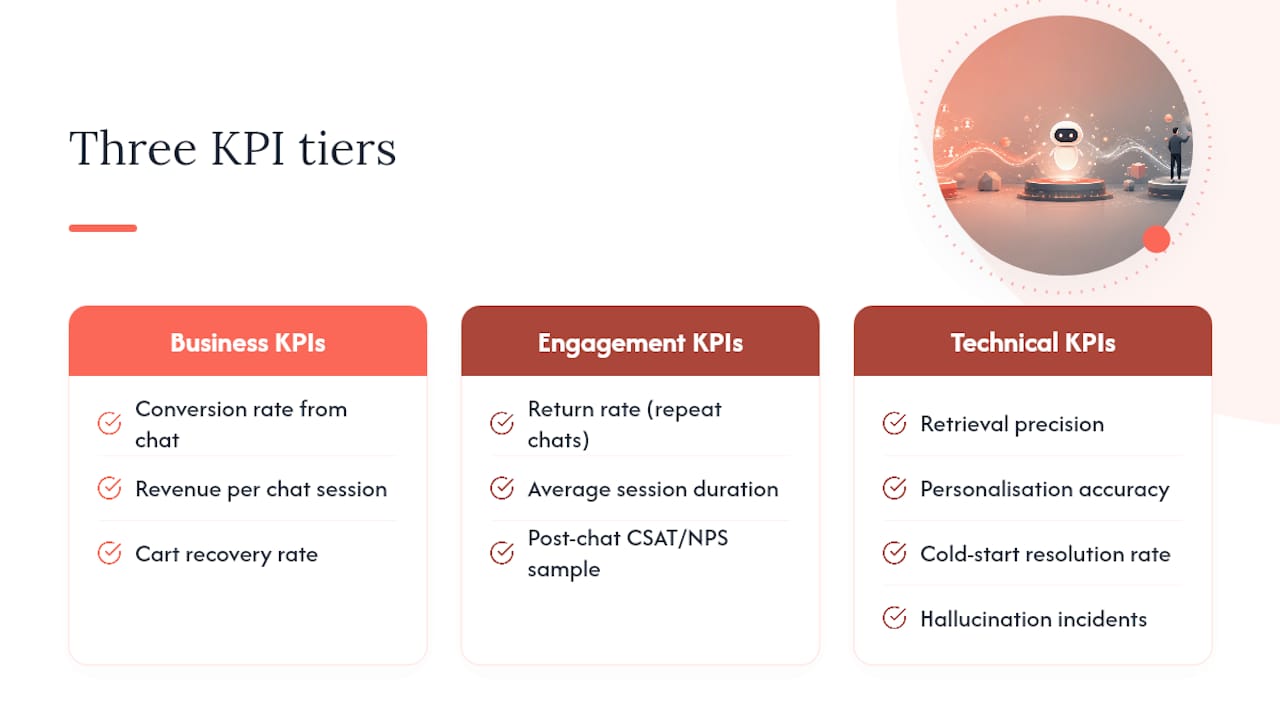
Engagement KPIs show whether the experience itself is landing: return rate (does the same customer chat again), average session duration, and a post-chat CSAT or NPS sample to catch dissatisfaction that doesn’t show up in the conversion numbers.
Technical KPIs catch the problems before customers complain about them: retrieval precision (how often the retriever pulls back genuinely relevant content), personalisation accuracy (does the response actually reflect the customer’s known profile and session context), cold-start resolution rate (how quickly a new visitor’s experience improves), and hallucination incidents (how often the bot states something false about stock, price, or policy).
The evidence consistently ties usefulness and enjoyment, not persona depth, to whether customers return to a chatbot. Every KPI framework above should be read through that lens: measure whether the bot is useful before measuring whether it’s charming.
For evaluation methods, run A/B tests against a holdout cohort that doesn’t see the personalised experience, so you can attribute lift correctly rather than assuming any improvement is the chatbot’s doing. Synthetic persona benchmarks, scripted test conversations covering a range of customer types and edge cases, catch failure modes before they reach real traffic, and they’re far cheaper to run repeatedly than waiting for live data to reveal a problem.
What privacy and governance rules apply to chatbot memory?
Any project that stores what a customer says or does needs a plan for consent, retention, and vendor accountability, not as an afterthought, but as part of the initial build.
- Give customers clear, plain-language visibility into what the bot stores and why, at the point where memory starts being captured, not buried in a privacy policy
- Offer an accessible opt-out and a genuine deletion path, and make sure the deletion actually removes the data from the vector store and CDP, not just the chat transcript
- Separate ephemeral session data (expires automatically after the visit) from persistent profile attributes (preferences, purchase history), and set explicit expiry rules for each category
- Review every vendor in the pipeline, the LLM provider, the vector database host, the CDP, for data access scope, encryption standards, and where processing physically happens
- Get processing-location and data-handling terms in writing before signing, since these vary meaningfully between providers and jurisdictions
Legal requirements around consent and data retention differ by jurisdiction, so validate the specifics against your own market’s regulations rather than treating any general guidance, including this checklist, as a substitute for that review.
Why brief Moormarketing for chatbot personalisation
Building a RAG-grounded personalisation pipeline touches catalogue data, CRM or CDP integration, and conversion-focused UX all at once, and most internal teams have deep strength in one of those areas but not all three simultaneously. That’s usually where an experienced outside team accelerates the timeline rather than replaces the work.
Moormarketing works with eCommerce brands on exactly this intersection, pairing chatbot marketing with the conversion and advertising systems that determine whether a personalised bot actually shows up where customers are already looking. The agency’s broader track record includes eCommerce clients scaling to seven-figure monthly sales through Google and social advertising, Shopify and WordPress conversion optimisation, and hands-on strategy work rather than outsourced execution.
Complex CDP integrations and cross-channel personalisation, where chatbot signals need to feed into email and ad retargeting, are the cases where agency execution earns its fee fastest:
- Workshops to align stakeholders and scope a pilot before committing engineering time
- Pilot builds scoped to one use case with a defined KPI, following the same phased approach outlined earlier in this guide
- Ongoing retainers for teams that want continuous iteration on personalisation accuracy and conversion once the pilot proves out
If you’re weighing whether to build this internally or brief it out, Moormarketing’s team is a practical place to start that conversation.
Key Takeaways
Grounded RAG architecture combined with session and lifelong memory drives measurable chatbot personalisation results, while persona depth alone does not improve retention.
| Point | Details |
|---|---|
| Prioritise usefulness over persona | Perceived usefulness and enjoyment, not identity depth, predict whether customers return to a chatbot. |
| Build the three data layers first | Session context, persistent CDP/CRM profile, and live catalogue data must all feed the RAG pipeline. |
| Fix cold-start with proactive questions | Ask one or two micro-questions early rather than waiting passively for behavioural signals to accumulate. |
| Pilot narrow, then scale | Test one product page or support flow with a single defined KPI before expanding to lifelong memory. |
| Treat retrieval as production software | Weak retrieval precision and stale embeddings are the most common causes of hallucinated or wrong answers. |
An editorial take on where personalisation projects go wrong
Most personalisation projects fail for a boring reason: someone spent the budget on the bot’s voice before anyone checked if the retrieval layer could answer a simple stock question correctly. The research is unambiguous on this point, and the industry keeps ignoring it anyway.
The conventional advice, define your brand persona, write a style guide, give the bot a name, treats personalisation as a branding exercise. It isn’t. It’s a data engineering problem wearing a conversational interface. The teams getting real conversion lift are the ones treating their retriever like production infrastructure, with monitoring, refresh cadences, and precision checks, not the ones with the wittiest chatbot.
If you take one thing from this guide, make it this: fund the plumbing first. Persona is the paint job. Nobody buys a car for the paint job if the engine doesn’t start.
— Liza
Sources
- Reevaluating personalization in AI-powered service chatbots: A study on identity matching via few-shot learning
- Towards Proactive Personalization of LLMs through Profile Customization for Individual Users in Dialogues
- HumAIne-Chatbot: Real-Time Personalized Conversational AI via Reinforcement Learning
- Change the theme and add customization to your chat embed (Shopify docs)
- Dori: AI Chatbot & Shopping Assistant for Shopify