
If your TikTok ads aren’t converting, one of three things is happening: the creative isn’t earning clicks, the post-click path is losing buyers, or conversions aren’t being tracked properly. Run this check right now: open TikTok Pixel Helper on your product page, confirm store orders are tagged with a TikTok source, then look at your click-through rate.
- Views but no clicks? Your creative isn’t earning attention. Fix the hook first.
- Clicks but no purchases? Something between the ad and checkout is losing buyers. Audit the landing page.
- Purchases happening but Ads Manager shows nothing? TikTok’s own troubleshooting guidance points to a tracking or attribution gap, not a creative problem.
Each failure mode needs a completely different fix. Chase the wrong one and you’ll waste budget for weeks.
Key Takeaways
TikTok ads stop converting for one of three reasons: weak creative, broken post-click experience, or tracking that isn’t capturing real sales.
| Point | Details |
|---|---|
| Run the 3-check diagnostic | Test 3-second view rate, CTR, and Pixel Helper before changing anything else. |
| Fix hooks before spend | Test 5+ hooks per body and retire any that miss the 20 to 25 percent 3-second view benchmark. |
| Match message end to end | Offer, price and call to action must be identical from ad to landing page to checkout. |
| Verify tracking with real orders | Place a test purchase and confirm it in TikTok Events Manager before trusting Ads Manager numbers. |
| Fund fewer ad groups deeper | Aim for 20 to 50 conversion events per group and use Moormarketing’s audit process to speed up diagnosis. |
Table of Contents
- Diagnosing why your TikTok ads aren’t converting
- Fixing weak hooks and low click-through rates
- Fixing the landing page and checkout when clicks don’t convert
- Fixing tracking gaps when purchases aren’t showing up
- Getting the learning phase and budget right for long-term conversion gains
- What actually goes wrong in most TikTok accounts we audit
- Get a second set of eyes on your TikTok account
- Sources
Diagnosing why your TikTok ads aren’t converting
Stop guessing and read the numbers in order. Your click-through rate (CTR) and 3-second view rate tell you if people are watching. Your event funnel, from view content to add to cart to complete payment, tells you where they drop off.
Here’s the sequence to run through:
- Check 3-second view rate first. Below 20 to 25 percent usually means the hook isn’t landing before the skip.
- Check CTR against your account average. A healthy in-feed ad typically clears 1 to 2 percent; well below that with a strong view rate points to a weak call to action or mismatched offer, not a bad hook.
- Check destination CTR and landing page load. If people click but bounce in under a few seconds, the problem is post-click, not creative.
- Pull the event funnel in Shopify or Google Analytics. Compare view content, add to cart and complete payment counts side by side to spot exactly where the drop happens.
Statistic to know: if your spend hits roughly three times your target cost-per-acquisition with zero conversions, the expected number of conversions at that spend is close to three, meaning a genuine zero is statistically unlikely. That’s your signal to pause the ad group and investigate rather than keep feeding it.
Most accounts skip this step and jump straight to “the algorithm hates us.” It rarely does. It’s usually one measurable thing in this list.
Fixing weak hooks and low click-through rates
Views without clicks almost always trace back to the first three seconds. TikTok users decide to keep watching or scroll within that window, and a weak 3-second view rate reliably predicts a weak CTR further down the funnel. Overproduced, studio-lit ads tend to underperform against native, creator-shot footage that looks like the content people scrolled past to get there.
Build a proper test recipe rather than launching one hero video and hoping:
- Write 5 different hooks against 1 core body/offer, giving you 5 variants minimum from a single script.
- Scale to 10 to 20 total creative variants once you’ve found a hook that clears benchmark.
- Use Spark Ads to boost organic posts that already show early traction, since Spark Ads often beat standard in-feed ads on CTR in practitioner testing.
- Refresh winning creative every 7 to 10 days before fatigue sets in.
- Read hook rate and watch-through time daily for the first 48 hours, not just CTR.
Our creative frameworks for social ads go deeper on the specific hook structures that hold attention past the skip point.
Pro Tip: Film the first 3 seconds like a stranger interrupted you mid-sentence, not like an ad opened with a logo. That’s the difference between a scroll-stopper and a skip.
Retire losers fast. If a variant hasn’t cleared your hook-rate benchmark within the first few hundred impressions, it’s not going to recover.
Fixing the landing page and checkout when clicks don’t convert
Clicks with no purchases point squarely at what happens after the tap, and message mismatch is one of the most common culprits. If the ad promises a discount, product, or angle that isn’t clearly visible on the landing page, buyers often bounce quickly.
Run this checklist against your current landing page:
- Match the offer exactly. Same product, same price, same promise, same call to action as the ad.
- Test mobile speed properly. Run the URL through PageSpeed Insights, cut unnecessary redirects, serve images through a CDN, and lazy load anything below the fold.
- Remove checkout friction. Show shipping cost and timeframe early, offer guest checkout, and cut form fields down to what’s essential.
Beyond the page itself, small checkout details compound fast on TikTok’s largely mobile, impulse-driven traffic:
- Local payment options (Apple Pay, Afterpay, or whatever’s standard in your market) reduce card-entry drop-off.
- Trust signals like reviews, secure-checkout badges and a visible returns policy matter more on cold TikTok traffic than on retargeted traffic elsewhere.
- A slow-loading hero image on mobile can cost you the sale before the buyer sees the product.
Our guide to landing pages that convert covers the same principles in more depth, and most of it transfers directly from Google traffic to TikTok traffic.
Fixing tracking gaps when purchases aren’t showing up
If your store shows sales that Ads Manager doesn’t, the problem is almost never the campaign. It’s the Pixel not firing correctly, or the attribution window not matching your buying cycle.
Work through this in order:
- Open TikTok Pixel Helper, place a real test order, and confirm the Purchase event fires and lands in Events Manager.
- Check whether you’re running Events API alongside the Pixel; server-side tracking recovers events that browser blocking or ad blockers otherwise lose, and deduplication settings prevent double-counting between the two.
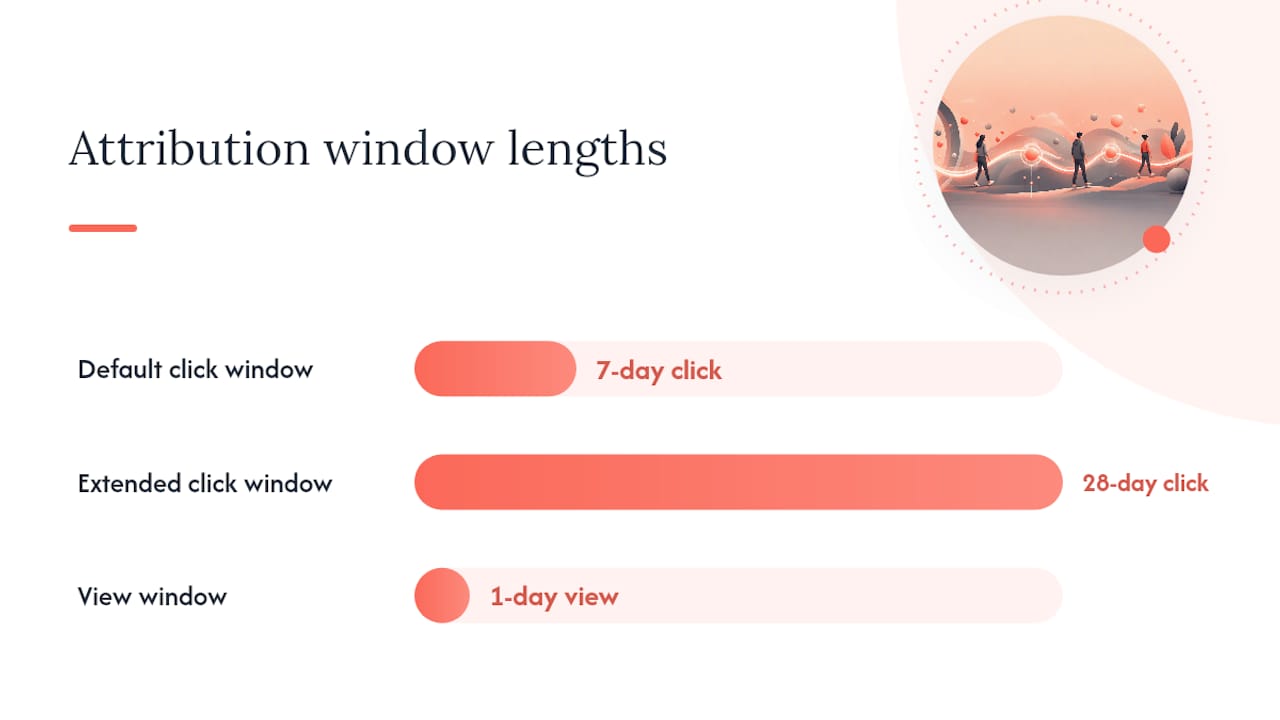
- Compare 7-day click attribution against 28-day click attribution. TikTok’s default window can be too short for considered purchases, and a longer window often surfaces sales the shorter one misses entirely.
- Check for time-zone mismatches between your store’s reporting and Ads Manager, since a same-day read can undercount conversions until the attribution window backfills them retroactively.
Figure worth knowing: TikTok’s standard default sits at a 7-day click, 1-day view window, which is why brands with longer consideration cycles often see their real numbers only after switching to 28-day click. Our pixel tracking guide walks through the technical setup for both the Pixel and Events API side by side.
Getting the learning phase and budget right for long-term conversion gains
Even with clean creative and a fast landing page, an ad group can underperform simply because it never got the chance to learn. TikTok’s algorithm needs a certain volume of optimisation events before delivery stabilises, and starving multiple ad groups thin usually performs worse than funding one properly.
- Aim for a sufficient number of conversion events per ad group in the early phase before judging performance.
- Apply the 3× target-CPA stop-loss: if spend triples your target CPA with zero sales, pause and diagnose rather than let it keep burning.
- Scale winning campaigns gradually in moderate budget increments to avoid resetting learning and losing accumulated signal.
- Avoid editing live ad groups (new creative, audience tweaks, bid changes) more than necessary. Every meaningful edit risks restarting the learning phase.
- If your account has thin conversion signal, build an event ladder, moving from View Content to Add to Cart to Complete Payment, so TikTok has intermediate signals to optimise toward while purchase volume grows.
- Refine audience segments gradually based on what the algorithm is already finding, rather than manually overriding targeting before it’s had a chance to learn.
Pro Tip: Resist touching a new ad group for the first 3 to 5 days even when the early numbers look shaky. Most premature “fixes” are really just impatience, and they cost you the learning progress you’ve already paid for.
On bidding, automated strategies generally outperform manual bidding once an account has enough conversion history to optimise against; manual bidding earns its place mainly in low-volume accounts still building signal. For a broader view of sequencing and budget rules across paid channels, our campaign best practices guide and this practitioner guide to TikTok targeting both cover audience refinement in more detail than fits here.
What actually goes wrong in most TikTok accounts we audit
The most common mistake isn’t bad creative or a broken pixel. It’s impatience: pausing ad groups, swapping creative, or rewriting audiences before the algorithm has gathered enough signal to judge fairly. Second most common: picking the wrong campaign objective for the funnel stage, then blaming “TikTok ads not converting” when the objective was never set up to drive purchases. Fix the sequence, not the symptom, and most accounts turn around within a fortnight.
— Liza
Get a second set of eyes on your TikTok account
There’s a difference between reading a checklist and having someone run it against your actual account. Moormarketing works hands-on with eCommerce brands to audit TikTok campaigns end to end: pixel verification, creative testing structure, landing page friction, and the budget sequencing that gets ad groups out of the learning phase and into consistent conversions.

This isn’t outsourced work handed to junior staff. Every audit and campaign rebuild runs through senior strategists who’ve taken accounts from stalled spend to seven figures a month, including a $2 million monthly result for a toy retailer and $3 million a month for a global furniture brand. If your TikTok account has been bleeding budget without a clear reason why, book a look at your digital ad campaign strategy or reach out directly through Moormarketing’s team to get your account audited properly.
Sources
TikTok Pixel Helper confirms whether your Purchase event fires correctly. PageSpeed Insights tests mobile load speed against real TikTok traffic conditions.
- TikTok Ads Not Converting? 8 Causes and How to Fix Each One
- TikTok Ads No Conversions? Fix Clicks That Do Not Sell – AdRate
- TikTok Ads Optimization: 2026 Playbook
- Agrowth