
Fix checkout friction and mobile performance before anything else. Aim for a baseline of 1–4% depending on store maturity, with top performers pushing past 4%. Start today: turn on guest checkout, add a digital wallet option, and strip every non-essential field from your checkout form.
TL;DR:
- Improving checkout speed and mobile performance, including enabling guest checkout and reducing form fields, can significantly increase conversion rates.
- Tracking full funnel metrics such as add-to-cart, cart-to-checkout, and checkout completion provides clearer insights into customer drop-off points.
- Optimizing speed through hosting, image compression, and disabling unnecessary scripts can boost conversions by up to 14% per 100-millisecond improvement.
- Running structured, data-driven tests on pricing, promotions, and upsell placements avoids guesswork and targets revenue-impact areas.
- Offering multiple digital wallet payment options and trust signals like reviews and clear policies reduces abandonment and builds shopper confidence.
Table of Contents
- What Is a Good WooCommerce Conversion Rate?
- How Do You Measure WooCommerce Conversion Rate Properly?
- High-Impact Fixes That Move the Needle Fastest
- Which Technical Fixes Give WooCommerce the Biggest Speed Boost?
- How Should You Prioritise and Test Conversion Changes?
- What Tools and Plugins Actually Help WooCommerce Conversion?
- How Moor Marketing Approaches WooCommerce Conversion Optimisation
- How Do Pricing and Promotions Change Your Conversion Rate?
- Do Payment Gateway Choices Affect Conversion Rate?
- What Are the Best Practices for Upselling on WooCommerce?
- What Trust Signals Actually Matter to WooCommerce Shoppers?
- Author perspective: a 90-day plan to lift your conversion rate
- How Moormarketing Can Help You Fix Your Conversion Rate
- Sources
- FAQ
What Is a Good WooCommerce Conversion Rate?
There’s no single number every store should chase. A brand-new WooCommerce store typically converts at 0.5–1%, a growing store sits around 1–2%, and an established, well-optimised store lands at 2–4% or higher, with general ecommerce norms hovering near 2.5–3.6%. Where you sit on that scale depends on how long you’ve been trading, not just how good your site looks.
Device matters more than most owners realise. Mobile traffic usually converts at a noticeably lower rate than desktop, even when mobile drives the bulk of the sessions, because forms are fiddlier and page weight hits harder on a phone connection.
A few other variables shift the target:
- Price point: higher-ticket items convert lower but carry bigger average order values.
- Traffic source: paid search and email typically outperform social and display.
- Product complexity: items needing comparison or configuration (furniture, electronics) convert slower than impulse buys.
Use these ranges as a starting goalpost, then benchmark your own store’s conversion rate against revenue per visitor rather than chasing an industry average that may not fit your category.
How Do You Measure WooCommerce Conversion Rate Properly?
The formula is simple: divide the number of orders by the number of sessions, then multiply by 100. But that single number hides where you’re actually losing customers, so track the full funnel:
- Add-to-cart rate — sessions that add a product, divided by total sessions.
- Cart-to-checkout rate — how many cart sessions reach the checkout page.
- Checkout completion rate — how many checkout starts turn into paid orders.
- Revenue per visitor (RPV) — total revenue divided by total sessions.
Each stage tells a different story. A healthy add-to-cart rate with a weak checkout completion rate points straight at checkout friction, not product appeal.
Ad blockers and consent banners routinely undercount GA4 events, so a server-side tracking layer or a plugin that pulls straight from WooCommerce order data gives you a more honest number.
RPV deserves special attention as the single metric that matters most, because it blends conversion rate and average order value into one figure. A tactic that lifts conversion rate but drops AOV can leave revenue flat, while RPV exposes that trade-off immediately.
High-Impact Fixes That Move the Needle Fastest
Checkout is where most revenue leaks out, so start there:
- Enable guest checkout — forcing account creation is still one of the biggest abandonment triggers.
- Cut form fields down to 6–8 fields maximum; every extra field is another chance to lose someone.
- Show shipping costs early, ideally on the product or cart page, not as a surprise at the final step.
- Hide the coupon field behind a link unless discounts are core to your offer. A visible “have a code?” box sends shoppers hunting for one elsewhere.
- Add digital wallets like Apple Pay and Google Pay. These cut checkout to one tap and reduce field entry to almost nothing.
Product pages need their own attention. A clear value proposition above the fold, genuine product photography from multiple angles, and a review count in the 11–30 range can lift conversion by roughly 68% compared with pages carrying few or no reviews. Add compatibility details and simple comparison guidance for anything technical.
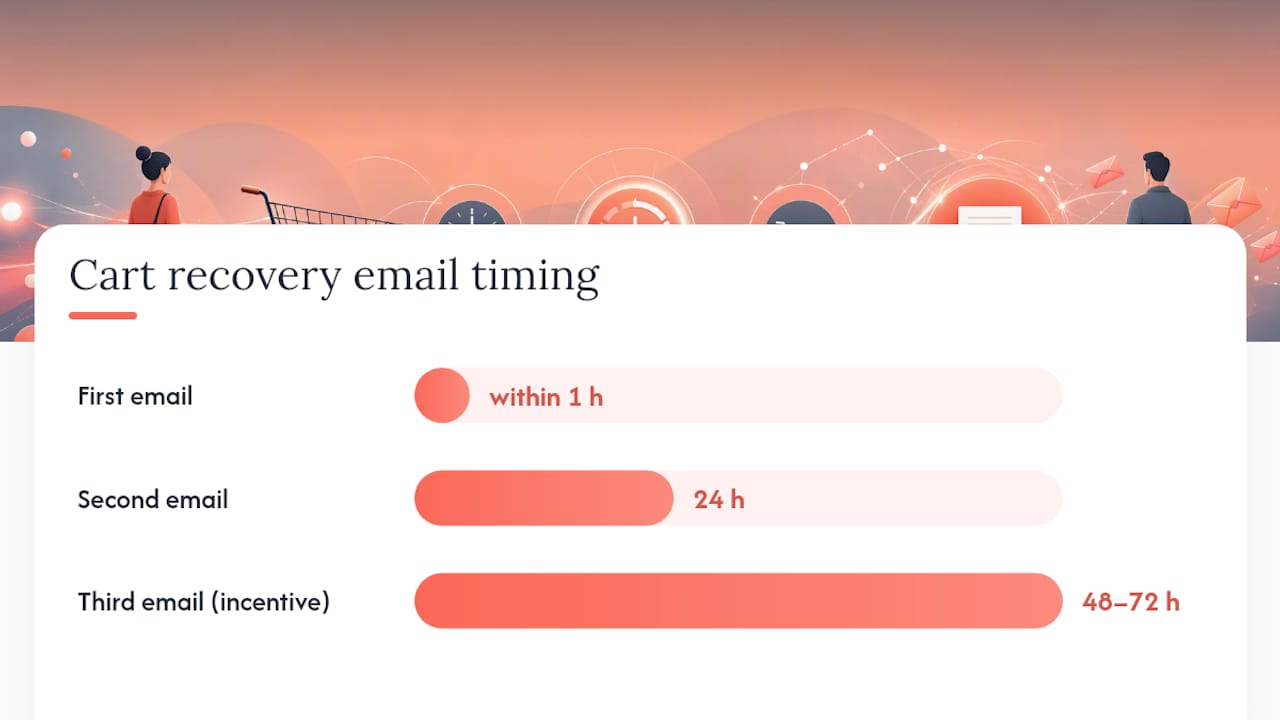
Cart recovery is non-negotiable given that global cart abandonment sits at 75.38%. A three-email sequence, first one within an hour, a second at 24 hours, and a third with an incentive at 48–72 hours, recovers a meaningful share of otherwise lost revenue. Pair it with an on-site exit prompt for immediate recovery.
Pro Tip: Test scarcity and urgency messaging (stock counters, limited-time pricing) on your highest-traffic product pages first. It’s a five-minute change with an outsized effect on decision speed.
For a deeper walkthrough of email cadence and templates, this abandoned cart email guide covers the mechanics in detail.
Which Technical Fixes Give WooCommerce the Biggest Speed Boost?
Performance problems hit WooCommerce harder than most platforms because every page load can trigger extra database queries. Google’s own research found that sites loading in 1 second convert around 2.5 times better than sites loading in 5 seconds, and each 100 millisecond improvement adds roughly 1% to conversions.
- Move to managed WooCommerce hosting with a CDN, then benchmark before and after with Lighthouse or PageSpeed Insights. Don’t guess. Measure.
- Mitigate the cart fragments script. WooCommerce’s
wc-cart-fragments.jsfires an AJAX request on every single page load to keep the mini-cart in sync, and it’s a well-documented performance bottleneck. Conditionally dequeue it on pages where the cart icon isn’t visible, or migrate to a block-based mini-cart that doesn’t rely on it. - Compress images, inline critical CSS, and audit third-party scripts. Tracking pixels and chat widgets are common silent culprits. For large catalogues, check slow queries against product attribute lookups.
Each extra second of load time can cut conversions by 7–14%, and stores loading under two seconds often convert at roughly double the rate of slower competitors.
How Should You Prioritise and Test Conversion Changes?
Run an audit before you touch anything. Pull your funnel numbers in GA4 and watch a handful of session recordings to find where real shoppers actually stall, not where you assume they do.
From there:
- Write one hypothesis tied to a single metric, ideally RPV or checkout completion rate, not a vague goal like “improve the site”.
- Change one variable at a time if you’re a smaller store. Trying to fix five things simultaneously destroys your ability to know what worked.
- For stores under roughly 10,000 monthly visitors, run single-change tests for two to four weeks and compare against the same traffic mix rather than relying on a formal A/B split.
- Larger stores with enough volume can run a proper 95% significance A/B test with a calculated sample size instead of a straight before-and-after comparison.
- Escalate to a developer or specialist once you’ve exhausted content and layout changes and the bottleneck looks technical.
This audit-first discipline stops you from optimising the wrong page for weeks while the real leak sits untouched further up the funnel. If you want a structured starting point, a conversion audit walkthrough shows how the process works in practice.
What Tools and Plugins Actually Help WooCommerce Conversion?
Stack fewer, better tools rather than a dozen mediocre ones. Start with GA4 for funnel visibility, paired with a specialist WooCommerce analytics or session-recording tool for the behavioural detail GA4 can’t show you.
- Cart recovery and review plugins sourced from well-maintained listings on WordPress rather than obscure marketplaces.
- Performance and caching plugins, plus an image optimiser to shrink product photo file sizes without visible quality loss.
- Digital wallet integrations for Apple Pay and Google Pay through your existing payment gateway.
Prioritise plugin maintenance history and update frequency over feature count. A plugin last updated two years ago is a bigger risk to your checkout than the feature it’s missing, and high-quality hosting will do more for your conversion rate than five extra plugins ever will.
How Moor Marketing Approaches WooCommerce Conversion Optimisation
Moormarketing runs every engagement through an audit, prioritise, test cycle: find the actual leak with funnel and session data, rank fixes by expected revenue impact, then test changes one at a time and measure against RPV. That framework has driven results like a $2 million monthly sales month for a new toy retailer and $3 million a month for a global furniture brand.
If you’ve already run the checkout and speed fixes above and growth has plateaued, that’s usually the point to bring in a senior strategist rather than keep testing solo.
How Do Pricing and Promotions Change Your Conversion Rate?
Price anchoring shifts conversion rate more than most owners test for. Showing a crossed-out “was” price next to a current price gives shoppers a reference point, and that reference point alone can move add-to-cart rates even when the discount itself is modest.
Percentage discounts tend to outperform flat-dollar discounts on lower-priced items, because “20% off” feels larger than “$5 off” even on identical maths, while flat-dollar framing works better on higher-ticket products where the percentage looks small.
Free shipping thresholds are one of the most reliable promotional levers in WooCommerce stores specifically, because shipping cost surprise is a known abandonment trigger. Setting a threshold slightly above your current average order value nudges shoppers to add one more item rather than abandon the cart, lifting both conversion rate and AOV in the same move.
Bundle pricing and limited-time offers work best when the urgency is real. A countdown timer on a promotion that actually ends creates genuine pressure. A fake countdown that resets damages trust the moment a returning customer notices it, and trust is expensive to rebuild once it’s gone.
Test promotional mechanics the same way you’d test a checkout field: one change, one metric, measured over a defined window. A discount that lifts conversion rate but tanks your margin isn’t a win, which is exactly why RPV and profit per order need to sit alongside raw conversion rate on your dashboard.
Do Payment Gateway Choices Affect Conversion Rate?
Yes, and the effect is bigger than most WooCommerce store owners assume. Every extra step between “click buy” and “payment confirmed” is a chance for a shopper to reconsider, get distracted, or hit an error message that kills the sale outright.
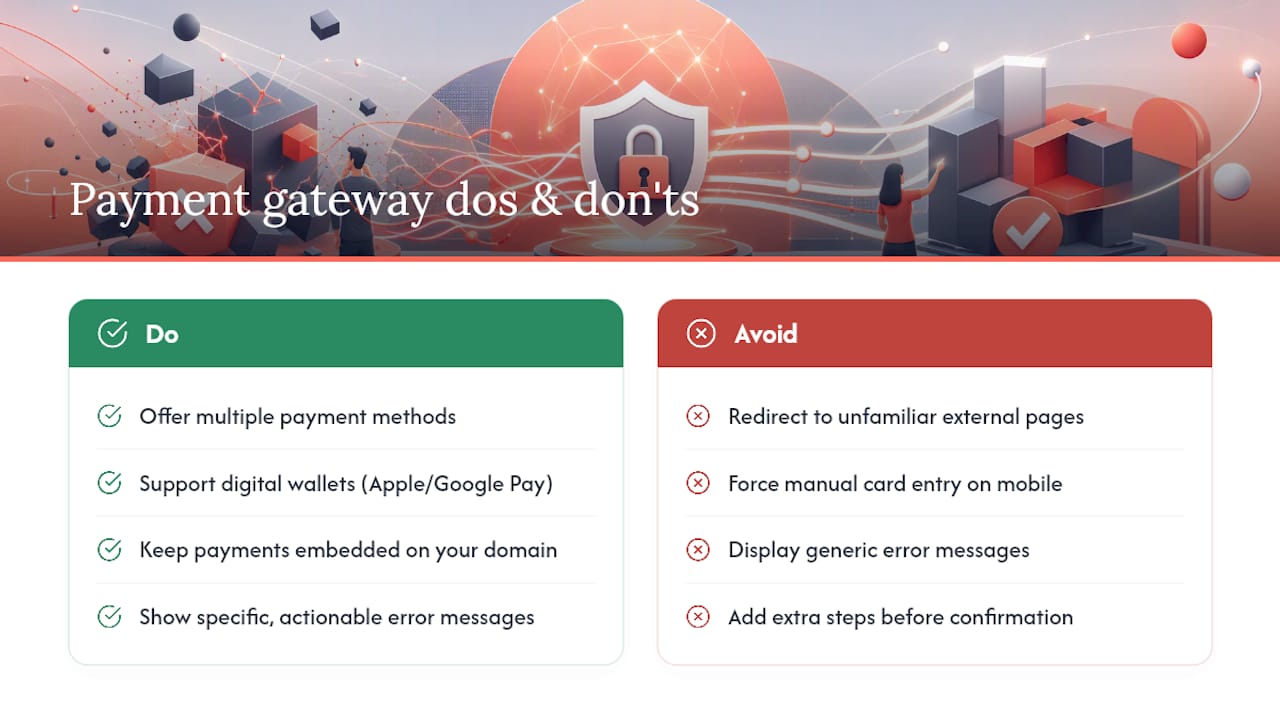
Offering multiple gateways matters because payment preference varies by customer and by country. A shopper who can’t use their preferred method, whether that’s a specific card network, a buy-now-pay-later option, or a digital wallet, will often abandon rather than switch to an unfamiliar payment type at the final step.
Digital wallets deserve particular weight here. Apple Pay and Google Pay skip manual card entry entirely, cutting checkout down to a single confirmation tap on mobile, which is precisely where WooCommerce stores lose the most conversions given how much harder manual form entry is on a small screen.
Redirect-based gateways that bounce shoppers to an external page introduce a visible break in the experience and a moment where trust can wobble, particularly on unfamiliar or poorly branded redirect pages. Embedded or inline payment fields that keep the shopper on your domain tend to perform better precisely because nothing about the page changes.
Failed payment handling matters just as much as the gateway itself. A generic error message with no explanation sends shoppers away for good, while a clear message telling them exactly what went wrong (wrong CVV, insufficient funds, expired card) gives them a reason to try again immediately instead of leaving.
What Are the Best Practices for Upselling on WooCommerce?
Product recommendations work best when they’re relevant, not just present. A “customers also bought” widget stuffed with random inventory does nothing for conversion and can actively distract from the purchase decision already in progress.
Cross-sells on the cart page, offering a genuinely complementary product at a lower price point than the main item, tend to outperform aggressive upsells that try to swap the shopper into a pricier version at the last second. The cart page is a moment of momentum. Don’t introduce friction by asking someone to reconsider their whole purchase.
Post-purchase upsells, shown on the thank-you page after payment is already confirmed, avoid the risk of derailing the original sale entirely. The shopper has already committed, so a well-timed one-click add-on can lift average order value without threatening the transaction that just happened.
Bundling related items at a small combined discount works particularly well for consumable or replenishable products, where the shopper is likely to need the second item eventually anyway. You’re not creating a new need. You’re just meeting one they already have sooner.
Product page optimisation that pairs strong recommendation placement with clear product copy tends to outperform either tactic used alone, because the recommendation only converts if the shopper already trusts the page they’re looking at.
What Trust Signals Actually Matter to WooCommerce Shoppers?
Security badges near the payment button still do real work, particularly for first-time visitors who’ve never bought from your store before and have no other reason to trust you yet.
An SSL certificate is table stakes now, not a differentiator, but its absence (a browser warning about an insecure connection) will kill a sale instantly. Beyond that baseline, visible payment provider logos, a clear returns policy linked from the product page, and genuine customer reviews with reviewer names attached all reduce the hesitation that shows up as cart abandonment.
Contact information matters more than owners expect. A visible phone number or live chat option, even if rarely used, signals there’s a real business behind the store. Its absence raises exactly the kind of doubt that sends a hesitant shopper searching for reassurance elsewhere before they’ll hand over card details.
Author perspective: a 90-day plan to lift your conversion rate
Weeks 1–4: fix checkout friction and mobile speed, and track checkout completion weekly. Weeks 5–8: layer in cart recovery emails and review collection, watching RPV. Weeks 9–12: test pricing and upsell placement. If RPV hasn’t moved by week eight, that’s your signal to bring in developer or agency support rather than keep guessing.
— Liza
How Moormarketing Can Help You Fix Your Conversion Rate
If you’ve worked through the checklist above and conversions still aren’t moving, the problem usually sits deeper than a single form field or plugin setting, and that’s where a structured audit earns its keep. Conversion audits, ongoing CRO retainers, and website design and development for WooCommerce and Shopify stores are built around the same audit, prioritise, test framework covered in this piece.

Instead of testing checkout tweaks alone for another quarter, you get a senior strategist looking at your funnel data directly and prioritising fixes by expected revenue impact, not guesswork. The Convert More Customers service page covers what a managed CRO engagement actually includes, and the 12 Week DOUBLE Your Revenue Challenge gives stores a structured, time-boxed alternative to open-ended DIY testing. Book a conversation through Moormarketing’s main site to get a clear read on where your funnel is actually leaking revenue.
Sources
- 13 Proven Strategies to Increase WooCommerce Sales in 2026
- What Is A “Good” WooCommerce Conversion Rate? Benchmarks and Improvement Strategies – Convesio
- Best practices for the use of the cart fragments API – WooCommerce developer
- WooCommerce CRO Playbook for 2026 | Glad Made
FAQ
Is a 12% Conversion Rate on a Website Good?
A 12% conversion rate is exceptionally high for a typical WooCommerce store and usually points to a very specific traffic mix, such as email-only campaigns or returning-customer segments, rather than a store-wide average. Compare it against your own historical baseline and traffic source rather than treating it as a universal target.
Is 2.5% a Good Conversion Rate?
Yes, 2.5% sits right in the general ecommerce norm of 2.5–3.6% and is solid for an established store.
What Is a Good Conversion Rate for an Ecommerce Store?
It depends on maturity: new stores typically see 0.5–1%, growing stores 1–2%, and established stores 2–4% or higher. Traffic source and price point shift these ranges, with email traffic often converting several times above the site average.
Can WooCommerce Handle a Very Large Product Catalogue?
WooCommerce can run large catalogues, but performance depends heavily on hosting quality, database optimisation, and how well plugins are managed rather than the platform itself imposing a hard limit. Stores with tens of thousands of products typically need managed WooCommerce hosting, a CDN, and regular database tuning to keep page speed and conversion rate stable at scale.
What Is the Fastest Fix for Low WooCommerce Conversion?
Checkout friction and mobile page speed deliver the quickest measurable gains, particularly enabling guest checkout, cutting form fields, and mitigating the wc-cart-fragments.js performance issue. Most stores can implement these within a day and start seeing funnel movement within the first testing cycle.