
Negative keywords are the single most underused lever in Google Ads. They stop irrelevant search queries from triggering your ads, which means every dollar you spend reaches people who actually want what you sell. Add a short account-level list of universal negatives today, schedule a weekly search-term review, and you will start reclaiming budget that is currently funding clicks that never convert.
What to expect from quick wins:
- Fewer wasted impressions on queries like “free,” “jobs,” or “how to DIY”
- Higher click-through rate as your ads appear for tighter, more relevant searches
- Lower cost per conversion as budget shifts toward queries with genuine purchase intent
- Cleaner signals for Smart Bidding, which helps automated campaigns learn faster
Immediate next steps:
- Build a short account-level list of universal negatives (start with “free,” “jobs,” “tutorial,” “cheap,” “salary”) and apply it today
- Block time every week, even 20 minutes, to review the Search Terms report in Google Ads
Pro Tip: Don’t wait until you have a “complete” negative list before acting. A list of ten well-chosen negatives applied today will outperform a perfect list applied next month.
Table of Contents
- What negative keywords actually do in your campaigns
- Negative match types: what each one blocks and where people go wrong
- Where to apply negatives and the limits you need to know
- How negatives shape automated bidding and Smart Bidding signals
- How to find negative keywords worth adding
- Adding negative keywords in Google Ads: the practical steps
- Common mistakes and the governance cadence that prevents them
- Measuring whether your negatives are actually working
- Starter negative lists and templates for Australian paid search
- Key takeaways
- A practitioner’s view on negatives as strategy, not housekeeping
- Moormarketing’s negative keyword audit and workshop offering
- Useful sources and tools
What negative keywords actually do in your campaigns
A negative keyword is an explicit instruction to Google Ads: do not enter the auction when a user’s query matches this term. Unlike positive keywords, which tell the platform what to target, negatives define the boundary of where your ads will not appear.
The way they interact with positive keywords is worth understanding clearly. Think of it as a two-gate system. A query first passes through the negative check. If it matches any negative keyword at the relevant scope, the auction stops there and your ad is excluded. Only queries that clear the negative gate then proceed to positive keyword matching and, if they match, enter the auction. This means negatives always take priority over positives, regardless of bid or Quality Score.

Here is a practical example for an Australian eCommerce retailer selling premium running shoes. The account targets “running shoes” as a broad match keyword. Without negatives, that campaign will attract queries like “running shoes for free,” “running shoes jobs Melbourne,” and “how to clean running shoes.” None of those searchers are buyers. Adding “free,” “jobs,” and “how to clean” as negatives filters those queries out before they ever cost a cent.
The same logic applies in services. A Sydney-based accountancy firm targeting “tax return” will attract queries from people looking for tax return jobs, tax return software reviews, or tax return Reddit threads. Negatives carve out that irrelevant traffic and leave only the queries that signal a prospective client.
Google Ads treats negatives as a core part of campaign architecture, not an afterthought. Tools like Optmyzr surface negative recommendations as part of their Traffic Sculptor workflow, and Moormarketing builds negative lists into every account structure from day one.
Negative match types: what each one blocks and where people go wrong
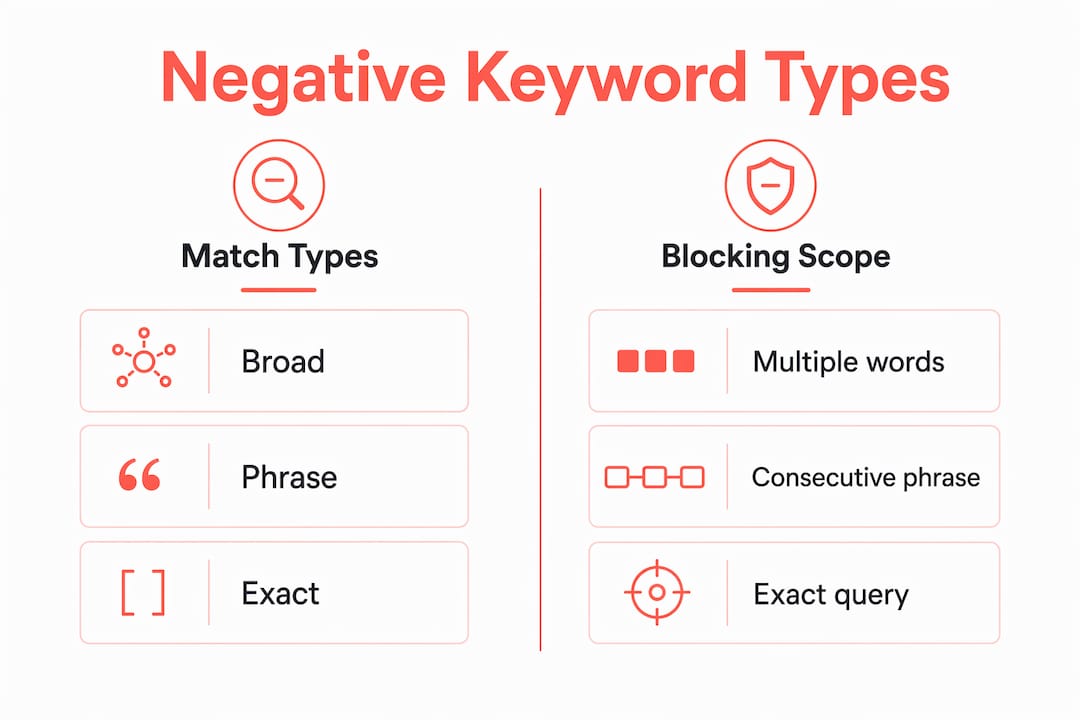
Understanding the three negative match types is where most PPC practitioners earn their keep. They behave quite differently from their positive counterparts, and the gaps between them cause real budget leakage.
Negative broad match
Negative broad match blocks a query only when all the words in your negative keyword appear in the query, in any order. Add “running shoes” as a negative broad, and a query like “cheap shoes for running” will still trigger your ad because the words appear in a different arrangement. This is the opposite of how positive broad match works, and it catches many advertisers off guard.
Negative phrase match
Negative phrase match blocks queries that contain your negative keyword as a consecutive phrase, in the same order. Add “running shoes” as a negative phrase, and queries like “buy running shoes online” and “running shoes Melbourne” are both blocked. The phrase must appear intact.
Negative exact match
Negative exact match blocks only the precise query, nothing more. Add [running shoes] as a negative exact, and only the query “running shoes” is excluded. “Buy running shoes” or “running shoes cheap” will still trigger your ad.
| Match type | What it blocks | Example negative | Blocked query | Not blocked |
|---|---|---|---|---|
| Negative broad | Queries containing all words (any order) | running shoes | “shoes for running cheap” | “running sneakers” |
| Negative phrase | Queries with the exact phrase intact | “running shoes” | “buy running shoes online” | “shoes running track” |
| Negative exact | Only the precise query | [running shoes] | “running shoes” | “buy running shoes” |
Critical difference from positive keywords: negatives do not match close variants. If you add “running shoe” (singular) as a negative, the query “running shoes” (plural) will still trigger your ad. You must add both forms manually. The same applies to common misspellings and synonyms. This is one of the most frequently missed details in negative keyword strategy.
A few practical rules of thumb:
- Use negative broad sparingly and only for terms where any combination of those words is irrelevant. It is the least precise option.
- Use negative phrase for specific intent signals you want to exclude across all query variations, such as “how to” or “for free.”
- Use negative exact when you want to block a specific query but keep related traffic flowing, useful for traffic sculpting between ad groups.
Pro Tip: Long queries can sometimes bypass negatives if the negative term appears beyond the platform’s query-length threshold. Always review long-tail queries in your Search Terms report and don’t assume a negative provides universal coverage.
Where to apply negatives and the limits you need to know
Choosing the right scope for a negative keyword matters as much as choosing the keyword itself. Apply a negative too broadly and you block legitimate traffic. Apply it too narrowly and the same wasted spend keeps appearing in a different campaign.

Account-level negatives propagate across all Search and Shopping campaigns in the account. They are the right home for terms that are irrelevant to your entire business, not just one product or service. As of 2026, account-level negatives are capped at 1,000 terms, so use this level deliberately. Universal exclusions like “jobs,” “free,” “tutorial,” and “salary” belong here.
Shared negative lists let you group related exclusions and apply the same list to multiple campaigns simultaneously. This is the most scalable approach for accounts with several campaigns. A well-maintained shared list for “competitor brand terms” or “irrelevant verticals” can be attached to new campaigns instantly, which saves time and reduces the risk of gaps.
Campaign-level negatives apply only within a single campaign. Use them when a term is irrelevant for one product range but relevant for another. An Australian outdoor retailer might exclude “indoor” at the campaign level for their camping gear campaign while keeping it available for their home furniture campaign.
Ad group-level negatives are the most granular option and the right tool for traffic sculpting. When two ad groups in the same campaign target overlapping keywords, ad group negatives prevent the wrong ad from showing. For example, if one ad group targets “trail running shoes” and another targets “road running shoes,” adding “trail” as a negative in the road group stops the campaigns from cannibalising each other.
- Universal waste terms (free, jobs, tutorial, cheap, salary, DIY) → account-level
- Industry-wide irrelevant verticals → shared negative list
- Product or service exclusions specific to one campaign → campaign-level
- Traffic sculpting between ad groups → ad group-level
Performance Max note: PMax campaigns operate differently. Standard negative keywords cannot be added directly to PMax campaigns through the regular UI. Brand exclusion lists are the primary control available, and PMax search terms reporting has improved in 2026, making it more practical to identify irrelevant queries. Account-level negatives do apply to PMax, so your universal list still provides a baseline layer of protection. For a deeper look at how PMax handles exclusions, Performance Max data exclusions covers the technical mechanics in detail.
How negatives shape automated bidding and Smart Bidding signals
Most practitioners think of negative keywords as a filter. The more accurate mental model is that they are instructions to the algorithm about what your account is for.
Smart Bidding learns from every auction your ads enter, including the ones that result in zero conversions. When your campaign repeatedly enters auctions for queries like “free accounting software” or “accounting jobs Brisbane,” the algorithm registers those signals. Over time, it builds a picture of your account’s intent that includes irrelevant traffic. Negatives remove those signals from the learning pool, which means the algorithm gets a cleaner read on what actually converts for you.
This has a direct effect on bid decisions. A Smart Bidding strategy like Target CPA or Target ROAS adjusts bids based on predicted conversion probability. If the model is trained partly on non-converting irrelevant queries, its predictions are noisier. Tighter exclusions produce a cleaner training set, which tends to improve bid accuracy over time.
The trade-off is real, though. Aggressive sculpting reduces the volume of auction data available to the algorithm, and Smart Bidding needs sufficient conversion data to function well. The strategic framing from Search Engine Land in 2025–26 describes this as treating exclusions as intentional instructions rather than simple maintenance. The practical implication: be deliberate about what you exclude and why, rather than building the longest possible negative list.
When to trust the machine and when to intervene:
- Trust Smart Bidding when conversion volume is healthy (30+ conversions per month per campaign) and the Search Terms report shows mostly relevant queries
- Intervene with negatives when you see clear patterns of irrelevant spend, when a specific query is burning budget without conversions, or when a new campaign is in its early learning phase and you want to protect it from obvious waste
Pro Tip: Use Optmyzr’s automated suggestion workflow as a first pass, then apply human review before adding any suggested negative. Automation surfaces candidates efficiently; a human decides whether the context justifies the exclusion.
How to find negative keywords worth adding
Discovery is where most accounts fall short. The Search Terms report is the obvious starting point, but it is not the only one.
Step-by-step weekly discovery workflow
- Open the Search Terms report in Google Ads. Filter by the last 7 days. Sort by cost descending to surface the most expensive irrelevant queries first.
- Set a cost threshold. For most Australian accounts, any query that has spent more than $10–$20 with zero conversions in the past 30 days deserves scrutiny.
- Look for intent signals. Queries containing “how to,” “what is,” “free,” “jobs,” “salary,” “review,” “Reddit,” or “DIY” are common candidates. Flag them for review, not automatic addition.
- Check impression volume. A query with one impression and no spend is not worth adding yet. Focus on patterns with enough data to be meaningful.
- Cross-reference with site search data. If your site has internal search, the terms people type after landing can reveal mismatches between what they expected and what you sell.
- Review analytics landing page data. High bounce-rate landing pages often signal traffic that arrived with the wrong intent. Trace those sessions back to their source queries.
- Mine support logs and customer enquiries. Recurring questions that reveal misunderstanding of your product (e.g. “does this come in a free version?”) point to exclusion candidates.
- Use Optmyzr’s Traffic Sculptor to identify ad group cannibalisation and get precise negative recommendations that prevent the wrong ad from winning an auction.
- Run an N-gram analysis on your search terms data. Grouping two- and three-word combinations reveals patterns that individual query reviews miss. A phrase like “how to” appearing across hundreds of queries is a single negative phrase that eliminates all of them.
- Review automated suggestions with scepticism. Google’s own negative keyword suggestions can be useful, but they sometimes recommend excluding terms that are actually relevant to your business. Always read the suggested query in context before applying.
Red flags that signal over-negating risk:
- You are reviewing a campaign that launched fewer than two weeks ago. Early data is noisy; wait for at least 30 conversions before drawing conclusions.
- The query has fewer than five impressions. One bad click is not a pattern.
- The term is a root category word (e.g. “shoes” for a shoe retailer). Excluding it will block enormous volumes of legitimate traffic.
Adding negative keywords in Google Ads: the practical steps
Account-level and campaign-level negatives via the UI
In Google Ads, navigate to Keywords in the left-hand menu, then select Negative keywords. From here you can add negatives at the campaign or ad group level by selecting the relevant campaign or ad group first. For account-level negatives, go to Tools & Settings > Shared Library > Account-level negative keywords.
Type or paste your terms, select the match type for each, and save. Google Ads will confirm the scope before applying.
Shared negative lists
Go to Tools & Settings > Shared Library > Negative keyword lists. Create a new list, name it clearly (see naming conventions below), add your terms, and then attach the list to the relevant campaigns via the Campaigns tab within the list view. Shared lists applied across multiple campaigns simplify maintenance considerably, since updating the list once updates every attached campaign simultaneously.
Recommended naming conventions:
[Universal] Waste Termsfor account-wide exclusions[Industry] Irrelevant Verticalsfor sector-specific exclusions[Product] Exclusions — [Campaign Name]for product-specific lists[Competitor] Brand Termsif you are excluding competitor-branded queries
Bulk uploads
For large lists, use the Google Ads bulk upload template. Download the template from Tools & Settings > Bulk Actions > Uploads, populate the required columns (campaign, ad group if applicable, keyword, match type), and upload. Before applying any large bulk list, run it through the Keyword Planner or a staging campaign to check for unintended conflicts with your positive keywords.
Performance Max specifics
Standard negative keywords cannot be added directly to PMax campaigns through the regular interface. Your options are:
- Account-level negatives, which apply to PMax automatically
- Brand exclusion lists, accessible via Tools & Settings > Shared Library > Brand lists
- Placement exclusions for Display inventory within PMax
PMax search terms reporting has expanded in 2026, giving you more visibility into what queries your PMax campaigns are matching. Review this report using the same weekly workflow described above. For a broader look at how PMax compares to standard Search campaigns for negative keyword control, the Moormarketing guide on Performance Max versus Search covers the operational differences clearly.
Common mistakes and the governance cadence that prevents them
The most common operational error in negative keyword management is “set it and forget it.” Accounts that were audited once at launch and never reviewed again accumulate irrelevant spend steadily, often without anyone noticing until the quarterly budget review.
Mistakes to stop making:
- Over-negating root category terms. Excluding “shoes” from a shoe retailer’s account blocks enormous volumes of legitimate traffic. Test broad negative patterns in the Keyword Planner before applying them account-wide.
- Assuming negatives cover close variants. They do not. “Running shoe” and “running shoes” must both be added manually.
- Adding negatives on insufficient data. A query with two impressions and no spend is not evidence of a problem. Wait for meaningful volume before acting.
- Mis-scoping negatives. Adding a campaign-level negative when the issue is isolated to one ad group blocks more traffic than necessary.
- No change log. When impression share drops unexpectedly, you need to know what changed and when. Without a log, troubleshooting is guesswork.
Governance cadence:
- Weekly: Review the Search Terms report. Flag candidates, apply clear exclusions, log changes.
- Monthly: Audit shared lists for terms that are no longer relevant (product lines discontinued, seasonal terms past their window). Check for keyword conflicts where a negative is blocking a positive keyword you want to keep.
- Quarterly: Full account audit. Review impression share trends, Quality Score changes, and conversion rate shifts. Involve stakeholders in sign-off for any major list changes.
Red flags to monitor:
- Sudden drop in impressions not explained by budget constraints or bid changes
- Impression share lost to budget declining while impression share lost to rank stays flat (suggests over-negating, not underbidding)
- Conversion volume declining without a corresponding drop in spend (traffic is arriving but converting less, which can indicate the wrong queries are getting through)
- Keyword conflicts flagged in the Google Ads recommendations panel
For teams managing multiple accounts, assign ownership of each shared list to a named person. That person is responsible for the weekly review and the change log. Rollback plans matter too: if a new batch of negatives causes an unexpected impression drop, you need to be able to reverse the change within hours, not days.
Measuring whether your negatives are actually working
Adding negatives without measuring their effect is the same mistake as not adding them at all. You need to know whether exclusions are improving efficiency or accidentally blocking conversions.
Key metrics to track before and after applying negatives:
- Conversion rate: Should improve as irrelevant traffic is removed
- Cost per conversion: Should decrease as budget concentrates on higher-intent queries
- Click-through rate: Should increase as ad relevance improves for the remaining queries
- Impression share: Watch this carefully. A healthy negative strategy reduces impressions from irrelevant queries, but should not reduce impression share for your target terms
- Quality Score: Improved query-to-ad relevance often lifts Quality Score over time, which reduces cost per click
A simple before/after test method:
- Record baseline metrics for the two weeks before applying a significant batch of negatives (conversion rate, CPA, CTR, impression share).
- Apply the negatives and allow a minimum two-week learning window before drawing conclusions. Smart Bidding needs time to adjust.
- Compare the same metrics for the two weeks post-application. Look for directional improvement across multiple metrics, not just one.
- If impression share drops sharply without a corresponding improvement in conversion rate or CPA, investigate for over-negating. Pull the Search Terms report and check whether any high-intent queries have disappeared.
Signals that negatives are causing harm:
- Impression share falling without budget constraints
- Conversion volume declining faster than spend
- Queries that previously converted well disappearing from the Search Terms report
When reporting to stakeholders, frame the impact in dollar terms. “We reduced wasted spend on non-converting queries” lands better with a budget owner than “we improved CTR by 0.4 percentage points.” Proactive negative keyword management typically helps advertisers recover a measurable portion of budget that would otherwise fund low-value clicks, and that recovery is worth quantifying in your reporting.
Starter negative lists and templates for Australian paid search
Ready-to-use starter lists save time and reduce the risk of obvious gaps. These categories cover the most common sources of wasted spend in Australian accounts.
eCommerce accounts:
free,free shipping(unless you offer it),free returns,free trialcheap,cheapest,discount code,coupon,voucherhow to make,DIY,tutorial,guide,review,Redditwholesale,bulk buy(unless you sell B2B)
Service businesses:
jobs,careers,employment,salary,wages,hire,recruitmentfree,pro bono,volunteercourse,training,certification,how to becometemplate,sample,example,download
Recruitment accounts (to exclude irrelevant job seekers):
salary,pay rate,award rate,enterprise agreementhow to write,resume template,cover letterjobs near me,casual jobs,part time(if not relevant to the role)
Australian-specific terms to consider:
Centrelink,NDIS(if not relevant to your service)Gumtree,Facebook Marketplace(signals bargain-hunting intent)- State-specific irrelevant terms (e.g.
NSWorVICif you only service Queensland)
CSV template columns for bulk imports:
Keyword(the negative term)Match Type(Broad / Phrase / Exact)Scope(Account / Campaign name / Ad group name)Justification(brief note on why it was added)Owner(who approved it)Date Added
For multi-channel accounts, the same discipline applies beyond Google Ads. Amazon negative keywords follow similar principles and can be managed with comparable governance workflows if your brand sells on Amazon Australia.
Localising for Australian English: Australian searchers use terms like “arvo,” “tradie,” “ute,” and “servo” in ways that US-centric negative lists will miss entirely. Review your Search Terms report specifically for Australian colloquialisms and add relevant exclusions. A campaign for a premium car service provider, for example, might need “ute hire” or “tradie van” as negatives if those queries are appearing.
Key takeaways
Negative keywords are not maintenance tasks. They are signal-shaping decisions that directly influence how Google’s algorithms interpret your account’s intent and allocate budget.
| Point | Details |
|---|---|
| Negatives take priority over positives | A query matching a negative keyword is excluded from the auction before positive keyword matching occurs. |
| Close variants are not covered | Add singular, plural, and common synonyms manually; negatives do not extend to close variants the way positive keywords do. |
| Scope determines impact | Apply universal waste terms at account level, product exclusions at campaign level, and traffic sculpting at ad group level. |
| Weekly reviews prevent budget drift | A 20-minute weekly Search Terms review catches new irrelevant queries before they accumulate significant spend. |
| Moormarketing builds negatives into account structure | Moormarketing treats negative keyword governance as a core part of campaign architecture, not an optional audit step. |
A practitioner’s view on negatives as strategy, not housekeeping
The conventional framing of negative keywords as “cleaning up” an account misses what they actually do. Every exclusion you apply is a statement about your account’s intent, and Google’s algorithms read those statements.
The accounts that get this right treat their negative list as a living document with an owner, a review cadence, and a change log. The accounts that get it wrong treat negatives as a one-time setup task and then wonder why Smart Bidding keeps chasing the wrong traffic six months later.
There is also a real tension between control and automation that most guides gloss over. Aggressive sculpting gives you precision but starves the algorithm of data. Too little sculpting and you are funding the algorithm’s education with your budget. The right balance depends on conversion volume. At lower volumes, be more selective with negatives and let the machine learn. At higher volumes, tighter exclusions tend to sharpen performance without hurting the learning signal.
One thing worth saying plainly: the strategic evolution of negative keywords in 2025–26 is not about adding more negatives. It is about adding the right negatives at the right scope, with a clear rationale, and measuring the effect. A list of 500 negatives applied without a governance process is often worse than a list of 50 applied with one.
The digital ad campaign best practices that actually move the needle in 2026 combine human judgement with tool-assisted discovery. Neither alone is sufficient.
Moormarketing’s negative keyword audit and workshop offering
If you have read this far and your immediate reaction is “our account has not had a proper negative keyword audit in months,” that is the right instinct to act on. Moormarketing works with eCommerce brands and service businesses across Australia to build negative keyword governance into their Google Ads accounts from the ground up, not as a one-off clean-up but as a repeatable weekly and quarterly process.

The offering covers three things: a full account audit that identifies current wasted spend and mis-scoped negatives, a hands-on workshop where your team learns the weekly review workflow and builds their first shared lists, and ongoing retained optimisation that combines Optmyzr-assisted discovery with senior strategist review. Every recommendation comes from a senior strategist, not an offshore team.
If you want to see the methodology in action before committing, the Google Ads case study shows how Moormarketing has applied this approach in real accounts. For teams ready to build the full governance process, the eCommerce marketing workshops are the fastest path from reading this guide to running it in your own account. Get in touch via the work with us page to discuss what your account needs.
Useful sources and tools
A short list of the references and tools that informed this guide, with notes on what each one contributes.
-
Google Ads Help: Negative keywords and match types — The primary source for how negative broad, phrase, and exact match behave, and the definitive reference for the close-variant exclusion rule.
-
Google Ads Help: Account-level negative keywords — Official documentation on account-level negative keyword limits (1,000 terms as of 2026) and how they propagate across Search and Shopping campaigns.
-
Cascader: Negative Keywords in Google Ads — Practical implementation guide covering shared lists, Performance Max notes, and budget recovery framing.
-
Search Engine Land: The real strategy behind negative keywords in 2026 — Strategic framing of negatives as signal-shaping tools for automated campaigns, useful for understanding the Smart Bidding implications.
-
Optmyzr: Negative Keywords in Google Ads — Covers the Traffic Sculptor workflow and automated negative discovery; the most useful tool-specific reference for discovery at scale.
-
AdWhiz: Negative Keyword Strategy — Covers themed shared list structures and naming conventions for scalable account hygiene.
-
Digital Codex: Negative Keywords — Practical reference for universal negative lists and the review process for common exclusion categories.
-
Moormarketing: What is a Performance Max campaign? — Moormarketing’s own guide to PMax mechanics, useful for understanding brand exclusion lists and search terms reporting in automated campaigns.