
Run the full audit checklist across your Merchant Center account, product feed and website before you touch the review button. Fix every mismatch you find, confirm at least one product is live in your data source, complete identity verification if Google asks for it, then request review. Reviews typically take 3 to 7 business days, and appealing before your fixes are actually live is the fastest way to trigger a cool down.
TL;DR:
- Most account suspensions result from misrepresentation or website issues, requiring consistent business and product information across all platforms.
- Fixing only the issue cited in the suspension email often leads to repeated suspensions; comprehensive audits of website, feed, and policies are essential.
- After requesting a review, merchants should wait 3 to 7 business days for approval, ensuring all changes are live and accurately reindexed.
- Reinstatement depends on addressing all underlying policy violations, not just the one flagged, and monitoring performance afterward prevents future bans.
- Engaging experts may be necessary if recurring suspensions happen despite following the audit steps, especially for complex account-level issues.
Table of Contents
- What a Merchant Center suspension actually does to your listings and ads
- Common causes of Merchant Center suspensions (what to look for first)
- Step-by-step audit checklist for Merchant Center, website and product feed
- Identity verification, requesting a review and the official timeline
- What happens after a review and common pitfalls that delay reinstatement
- Ongoing prevention: monitoring routines to avoid future bans
- Agency perspective: when to fix it yourself and when to call in help
- How Moormarketing can help you get reinstated and stay that way
- Official Google help pages worth bookmarking
- Sources
- FAQ
What a Merchant Center suspension actually does to your listings and ads
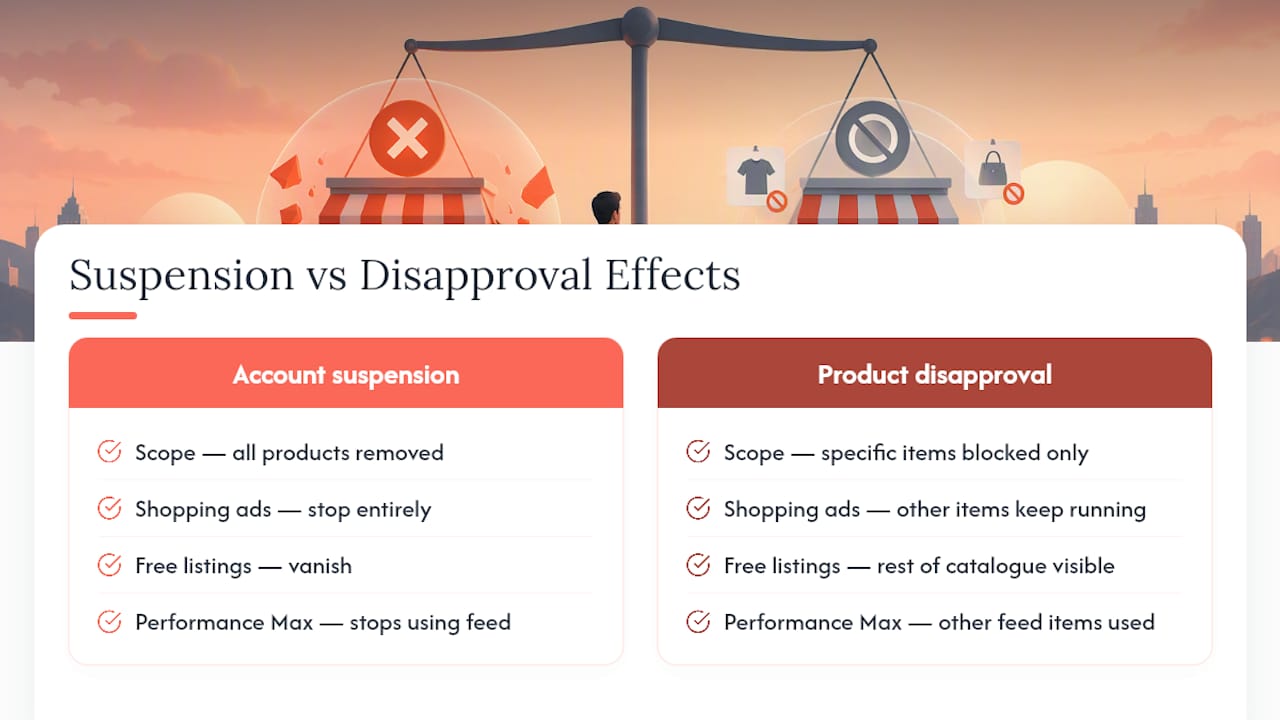
An account-level suspension pulls every product you sell off Google entirely. Shopping ads stop, free listings vanish, Performance Max stops pulling from your feed, and dynamic remarketing loses its product data. That’s different from a product-level disapproval, which only blocks specific items while the rest of your catalogue keeps running.
Google tells you which one you’re dealing with in two places: the email sent to your account contact, and the Needs attention and Diagnostics tabs inside Merchant Center. Check both before assuming the worst. A single disapproved product because of a bad GTID is a five-minute fix. A full account suspension for misrepresentation is a different job entirely, and it’s the one that stops your entire Shopping strategy dead until you resolve it.
Common causes of Merchant Center suspensions (what to look for first)
Most suspensions trace back to a small set of repeat offenders, and misrepresentation sits at the top of the list. Google wants your site, your feed and your checkout to tell the exact same story about who you are and what you sell.
- Misrepresentation of self or product: inconsistent pricing between your feed and landing page, exaggerated claims, or missing policy pages that make your business look unverifiable.
- Website needs improvement: broken checkout flows, placeholder or “Lorem ipsum” text still live on a page, or no visible shipping and returns information.
- Feed data mismatches: prices or stock levels that don’t match your live landing pages, invalid GTINs, or product images that fail to load.
- Insufficient contact and business information: a missing physical address, no working phone number, or details that don’t match your business registration.
- Egregious violations: DMCA takedown reports or listings for prohibited products, which tend to trigger faster, harsher action than routine policy issues.
Return policy problems deserve a special mention. Google expects a clear, conspicuous returns policy on your site, and if you don’t accept returns, you need to say so explicitly rather than leaving the page out entirely, according to Google’s own merchant guidelines.
Step-by-step audit checklist for Merchant Center, website and product feed
Work through this in order. Skipping steps to save time is exactly what causes repeat suspensions.
- Check Merchant Center settings first. Confirm your store name, business address, payment profile and contact details all match your official business registration, with no typos or outdated entries.
- Audit every core website page. Your contact page, full shipping and returns policy, terms of service and privacy policy all need to exist, load over HTTPS, and read like a real business wrote them, not a placeholder.
- Test your checkout flow end to end. Add a product to cart and go all the way through to payment. A broken or looping checkout is one of the more common causes on the Search Engine Land breakdown of suspension fixes.
- Cross-check your feed against live pages. Prices, availability and shipping attributes in your data source must match what a shopper sees on the landing page, exactly, not approximately.
- Verify images and GTINs load correctly. Broken image URLs and invalid GTINs are quiet killers that don’t always throw an obvious error.
- Scan your digital footprint. Check for public complaints, scam-report listings or mismatched business details elsewhere online that Google’s trust signals might be picking up.
- Wait before requesting review. Give crawlers 24 to 48 hours to reindex your changes once fixes go live, since Google’s own guidance treats this as the difference between a clean pass and a failed appeal.
Pro Tip: Screenshot every page before and after your fixes. If Google’s review comes back with a partial denial, you’ll want proof of exactly what changed and when.
Identity verification, requesting a review and the official timeline
You’ll find the review flow inside Merchant Center under Products > Needs attention, or via third-party apps connected to your account if you manage feeds that way. Some suspensions require identity verification (IDV) first, and Google will typically ask for documents like a business registration certificate or a government-issued ID that match the details already on file.
Once IDV is cleared and you’ve clicked “I fixed the issue” or “Request review,” here’s what to expect on timing:
- Standard reviews commonly take 3 to 7 business days, though Google notes more complex cases can run longer.
- Technical recrawls after a fix, like an updated shipping policy page, usually resolve within 24 to 48 hours, but the full review attached to it can still take the full week.
- If a review fails, the button greys out and a cool down period kicks in. Support staff cannot bypass this, no matter how the request is worded.
That last point trips up more merchants than any policy detail. The instinct is to contact support and push for a faster turnaround. It doesn’t work, and the wait is better spent auditing everything else you might have missed.
What happens after a review and common pitfalls that delay reinstatement
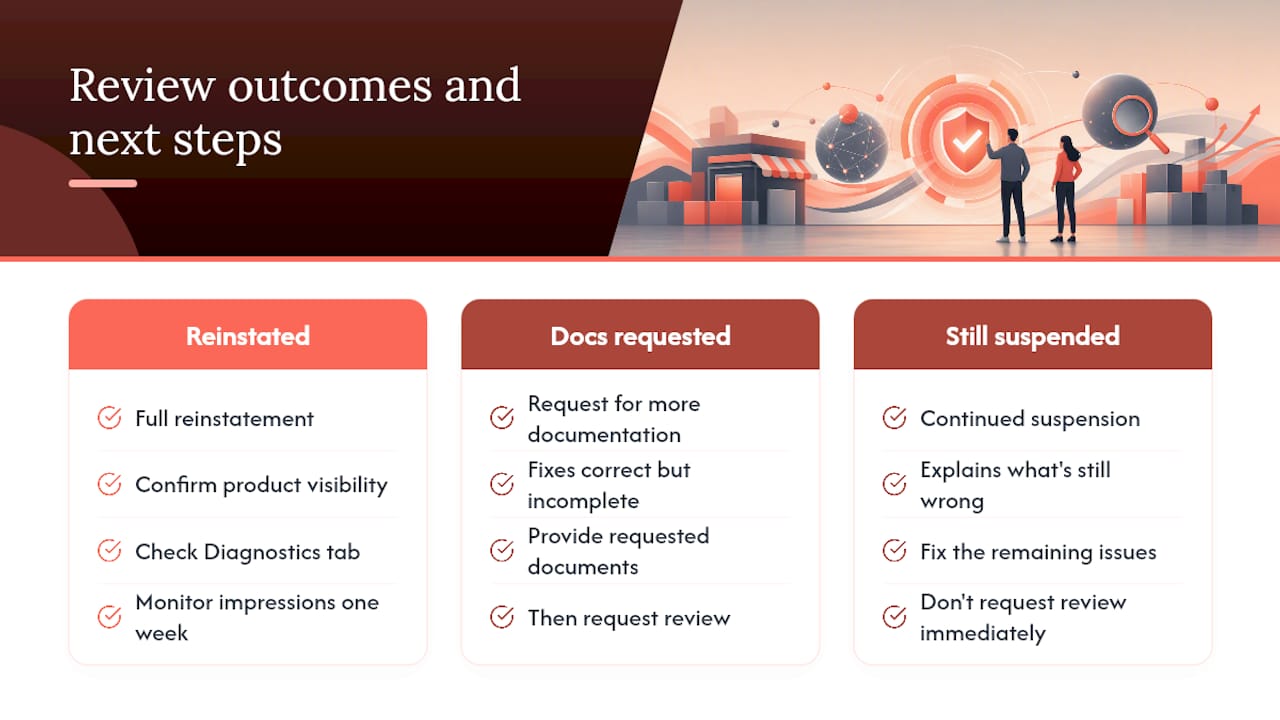
Three outcomes are possible once a review completes: full reinstatement, a request for further documentation, or continued suspension with an explanation of what’s still wrong. The middle outcome is common when your fixes were correct but incomplete, say, you fixed the feed but left a placeholder page live on the site.
Repeated suspensions almost always come down to partial fixes. A merchant patches the one issue named in the email, requests review immediately, and gets knocked back for a second issue that was there the whole time. Comprehensive audits beat targeted patches for exactly this reason.
Once reinstated, confirm it properly: check product visibility in the Diagnostics tab, watch impressions return in Shopping campaigns, and monitor performance for a week rather than assuming a green tick means it’s over for good.
Ongoing prevention: monitoring routines to avoid future bans
Prevention is cheaper than recovery every time. Build a weekly habit of checking feed processing status and scanning for new warnings in Diagnostics before they escalate.
- Run a weekly feed validation pass to catch price, availability or GTIN errors before Google flags them.
- Stage major changes, price updates, shipping policy edits, checkout redesigns, and require a second person to sign off before they go live.
- Set up automated alerts for feed errors, broken landing pages or price mismatches rather than relying on manual checks.
- Keep a record of how you respond to third-party complaints or DMCA notices, since repeat egregious reports carry more weight than isolated ones.
Pro Tip: Treat your returns policy and contact page like code, version them, and never let a redesign quietly drop the language Google is scanning for.
Agency perspective: when to fix it yourself and when to call in help
A capable in-house team can usually resolve a single, well-documented product disapproval in an afternoon. Account-level suspensions for misrepresentation are a different animal, because the fix usually spans site copy, feed structure and business verification simultaneously, and missing one thread anywhere resets the clock.
Moormarketing works these audits by treating the site, the feed and the ad account as one connected system rather than three separate fixes. That’s the same instinct that underpins client outcomes like a $2 million monthly sales month for a toy retailer and $3 million a month for a global furniture brand, where the campaign performance was only ever as good as the underlying feed and site health. If you’ve already tried the audit checklist twice and you’re still failing review, that’s usually the signal to bring in a second set of eyes rather than a third attempt at the same fix.
— Liza
How Moormarketing can help you get reinstated and stay that way
Most agencies will happily rebuild your Shopping campaigns once you’re reinstated. Fewer will actually sit inside your feed and site data with you to work out why the suspension happened in the first place, which is the part that actually stops it recurring. Moormarketing runs full site and Merchant Center audits as part of its Google advertising work, pairing feed fixes with Performance Max management so your campaigns pick back up the moment reinstatement lands, not weeks later.

If your account is currently suspended, the priority is getting the audit right the first time, not filing a quick appeal and hoping. Moormarketing’s senior strategists handle this work directly rather than outsourcing it, and the same audit process feeds into broader ecommerce strategy work once your listings are back live. For merchants who want a structured way to rebuild momentum fast after reinstatement, the 10 Day Scale-Ready Roadmap is worth a look, and the Convert More Customers service picks up where the feed fix leaves off, turning restored traffic into actual sales. Get in touch through the Moormarketing site to book a site and Merchant Center audit before you file your next review request.
Official Google help pages worth bookmarking
Keep these on hand for anything account-specific your suspension email doesn’t fully explain:
- Issues in Merchant Center for general suspension and review timing.
- Fixing Merchant Center warnings and account suspensions for policy-violation specifics and cool down behaviour.
- Request a review of your issues for the exact review request flow and IDV requirements.
- Troubleshoot my data source for feed upload and SFTP errors.
Your account’s Needs attention tab always overrides generic guidance. Check it first for instructions specific to your suspension.
Sources
- Issues in Merchant Center – Google Merchant Center Help
- Fixing Merchant Center warnings and account suspensions for policy violations – Google Merchant Center Help
- Request a review of your issues – Google Merchant Center Help
- Fix a suspended Google Merchant Center account – Search Engine Land
FAQ
What does it mean when my Google Merchant Center is suspended?
It means Google has removed your entire product catalogue from Shopping ads, free listings and Performance Max feeds until you fix the underlying policy violation. Check the Diagnostics tab and your account email to see the exact reason cited.
How do I fix a suspended payment profile?
A suspended payment profile is usually separate from a product policy suspension and is often tied to billing details or verification documents that don’t match your business records. Update your payment details to match your registered business name and address exactly, then follow the prompts Google gives inside the Payments section.
How do I fix a suspended Merchant Center account?
Run a full audit of your Merchant Center settings, website pages and product feed, fix every mismatch you find rather than just the one Google named, then request a review once changes are live and indexed. Full audits consistently outperform single-issue patches for reinstatement.
What happens once your account gets suspended?
All your product listings disappear from Google Shopping, free listings and Performance Max campaigns immediately, and any ad spend tied to those feeds stops converting. You’ll get an email with the stated reason, though the real cause is sometimes broader than what’s listed there.
How long does a Merchant Center review actually take?
Standard reviews typically take 3 to 7 business days, and technical recrawls after a fix often resolve within 24 to 48 hours. A failed review triggers a cool down period where the request button is disabled and support cannot speed it up.